<br />
<b>Notice</b>:  Undefined variable: wpmu_version in <b>/home/aqoqxcwlfcfh/public_html/wp-content/plugins/kb-advanced-rss-widget/versions/wp-2-8.php</b> on line <b>27</b><br />
<br />
<b>Notice</b>:  Undefined index: kbrss in <b>/home/aqoqxcwlfcfh/public_html/wp-content/plugins/kb-advanced-rss-widget/versions/wp-2-8.php</b> on line <b>735</b><br />
<?xml version="1.0" encoding="UTF-8"?>
<rss version="2.0"
	xmlns:content="http://purl.org/rss/1.0/modules/content/"
	xmlns:wfw="http://wellformedweb.org/CommentAPI/"
	xmlns:dc="http://purl.org/dc/elements/1.1/"
	xmlns:atom="http://www.w3.org/2005/Atom"
	xmlns:sy="http://purl.org/rss/1.0/modules/syndication/"
	xmlns:slash="http://purl.org/rss/1.0/modules/slash/"
	>

<channel>
	<title>Marketing Strategy Today &#187; hootsuite</title>
	<atom:link href="https://www.pamsahota.com/tag/hootsuite/feed/" rel="self" type="application/rss+xml" />
	<link>https://www.pamsahota.com</link>
	<description>Digital. Content. Brand.</description>
	<lastBuildDate>Sat, 13 Sep 2025 17:28:21 +0000</lastBuildDate>
	<language>en-US</language>
	<sy:updatePeriod>hourly</sy:updatePeriod>
	<sy:updateFrequency>1</sy:updateFrequency>
	<generator>http://wordpress.org/?v=3.4.2</generator>
		<item>
		<title>Five Affordable Social Media Analytics Tools for your Brand</title>
		<link>https://www.pamsahota.com/social-media-2/five-affordable-social-media-analytics-tools-for-your-brand/</link>
		<comments>https://www.pamsahota.com/social-media-2/five-affordable-social-media-analytics-tools-for-your-brand/#comments</comments>
		<pubDate>Sun, 08 Sep 2013 22:37:21 +0000</pubDate>
		<dc:creator>Pam Sahota</dc:creator>
				<category><![CDATA[social media]]></category>
		<category><![CDATA[bottlenose]]></category>
		<category><![CDATA[Customer Service]]></category>
		<category><![CDATA[facebook insights]]></category>
		<category><![CDATA[featured]]></category>
		<category><![CDATA[google analytics]]></category>
		<category><![CDATA[hootsuite]]></category>
		<category><![CDATA[listening]]></category>
		<category><![CDATA[monitoring]]></category>
		<category><![CDATA[radian6]]></category>
		<category><![CDATA[social flow]]></category>
		<category><![CDATA[Social media]]></category>
		<category><![CDATA[socialnomics]]></category>
		<category><![CDATA[topsy]]></category>
		<category><![CDATA[twitalyzer]]></category>
		<category><![CDATA[twitter]]></category>

		<guid isPermaLink="false">https://pamsahota.com/?p=1772</guid>
		<description><![CDATA[We all know that social media is not free especially when it comes to community management, creating content, and boosting posts to be promoted (ex.Twitter). Social media analytics are another cost that entails some investment when it comes to your &#8230; <a href="https://www.pamsahota.com/social-media-2/five-affordable-social-media-analytics-tools-for-your-brand/">Continue reading <span class="meta-nav">&#8594;</span></a>]]></description>
			<content:encoded><![CDATA[<!-- Start Shareaholic LikeButtonSetTop Automatic --><div style="clear: both; min-height: 1px; height: 3px; width: 100%;"></div><div class='shareaholic-like-buttonset' style='float:none;height:30px;'><a class='shareaholic-fblike' data-shr_layout='button_count' data-shr_showfaces='false' data-shr_href='https%3A%2F%2Fwww.pamsahota.com%2Fsocial-media-2%2Ffive-affordable-social-media-analytics-tools-for-your-brand%2F' data-shr_title='Five+Affordable+Social+Media+Analytics+Tools+for+your+Brand'></a><a class='shareaholic-googleplusone' data-shr_size='medium' data-shr_count='true' data-shr_href='https%3A%2F%2Fwww.pamsahota.com%2Fsocial-media-2%2Ffive-affordable-social-media-analytics-tools-for-your-brand%2F' data-shr_title='Five+Affordable+Social+Media+Analytics+Tools+for+your+Brand'></a><a class='shareaholic-tweetbutton' data-shr_count='horizontal' data-shr_href='https%3A%2F%2Fwww.pamsahota.com%2Fsocial-media-2%2Ffive-affordable-social-media-analytics-tools-for-your-brand%2F' data-shr_title='Five+Affordable+Social+Media+Analytics+Tools+for+your+Brand'></a></div><div style="clear: both; min-height: 1px; height: 3px; width: 100%;"></div><!-- End Shareaholic LikeButtonSetTop Automatic --><p><span style="font-size: 13px;">We all know that social media is not free especially when it comes to community management, creating content, and boosting posts to be promoted (ex.Twitter). Social media analytics are another cost that entails some investment when it comes to your marketing strategy and overall marketing goals. Of course there are always the free tools like </span><a style="font-size: 13px;" href="http://www.google.com/analytics/">Google Analytics</a><span style="font-size: 13px;"> and </span><a style="font-size: 13px;" href="https://www.facebook.com/help/search/?q=insights">Facebook Insights.</a><span style="font-size: 13px;"> Google Analytics help you determine what social sites are helping to drive traffic to your site and what campaigns are working versus those that need to be dumped or optimized. Facebook Insights is constantly evolving but overall it allows you to see what content your fans engage with, when and how often.</span></p>
<div>
<div><strong>Here are 5 more to consider for your social toolbox: </strong></div>
<div></div>
<div><strong>1. <a href="http://topsy.com/">Topsy</a></strong>- Simple, easy to use tool that comes in a free (or paid) version in order to let brands monitor Twitter. One of my favorite parts about it is that you can see what hashtags are being used – how often, by who, and what the conversation is around that hashtag. This is a crucial step to take before using hashtags in your tweets, in order to ensure it is the proper conversation for your brand, your tone/voice, and of course your audience.</div>
<div></div>
<div><strong>2. <a href="https://hootsuite.com/">Hootsuite</a></strong>- I think we all know Hootsuite, but it is sometimes overlooked. It’s a great community management tool (free or very cheap) that enables a community manager to monitor, schedule posts, and manage multiple channels from one location. And it comes with an analytics portion which allows you to customize reports for easy analysis and sharing with management.</div>
<div></div>
<div><strong>3. <a href="http://twitalyzer.com/5/index.asp">Twitalyzer</a></strong>- Quick, easy to use tool that allows you to monitor your competition (specifically for Twitter). Obviously not the only tool to use, but a nice tool to add on to your arsenal when needed.</div>
<div></div>
<div><strong>4. <a href="http://bottlenose.com/">Bottlenose</a></strong> –  Great visual of conversation going on around your brand in real time. It helps you visualize what your brand is connected to or who the influencers are and what they are influential about. Great for monitoring, targeting, and being able to engage in real time and not losing out.</div>
<div></div>
<div><strong>5. <a href="http://www.socialflow.com/">Social Flow</a></strong> – Not free, but gives your brands an edge up when scheduling posts and tweets, to see when is the best time for your brand to hop into a conversation for your particular audience. It helps to ensure that you are using the write phrasing, and taking advantage of the best time and day for that particular social engagement – whether it’s during a live event or otherwise.</div>
<div>
<p><strong>Bonus: If you have the budget to spend a little more money</strong></p>
<p><strong><a href="http://www.salesforcemarketingcloud.com/">Radian6</a> - </strong>Great listening tool to see what is being said about your brand, the competition, what’s occurring in real time, and of course the ability to hop into conversations with your customers and be a part of the community. This tool is perfect for finding your influencers, and engaging with them organically as it streamlines the process for your brand and makes the process way less manual and less cumbersome.</p>
</div>
<div>Not sure which one you want to use? TIP: Many tools will allow a free trial before you jump in with the fee, so always see if you can test out the tools first.</div>
</div>
<div></div>
<div>Note: This post was originally written for socialnomics and my post can also be found<a href="https://www.socialnomics.net/2013/08/27/five-affordable-social-analytics-customer-service-tools/"> here</a>.</div>
<div class="shr-publisher-1772"></div><!-- Start Shareaholic LikeButtonSetBottom Automatic --><!-- End Shareaholic LikeButtonSetBottom Automatic -->]]></content:encoded>
			<wfw:commentRss>https://www.pamsahota.com/social-media-2/five-affordable-social-media-analytics-tools-for-your-brand/feed/</wfw:commentRss>
		<slash:comments>0</slash:comments>
		</item>
		<item>
		<title>How to: Avoid Social Media Overload</title>
		<link>https://www.pamsahota.com/uncategorized/how-to-avoid-social-media-overload/</link>
		<comments>https://www.pamsahota.com/uncategorized/how-to-avoid-social-media-overload/#comments</comments>
		<pubDate>Fri, 21 Jun 2013 02:06:55 +0000</pubDate>
		<dc:creator>Pam Sahota</dc:creator>
				<category><![CDATA[Uncategorized]]></category>
		<category><![CDATA[community management]]></category>
		<category><![CDATA[featured]]></category>
		<category><![CDATA[home base]]></category>
		<category><![CDATA[hootsuite]]></category>
		<category><![CDATA[listening feeds]]></category>
		<category><![CDATA[Social media]]></category>
		<category><![CDATA[startup fashion]]></category>
		<category><![CDATA[time management]]></category>

		<guid isPermaLink="false">https://pamsahota.com/?p=1730</guid>
		<description><![CDATA[Social Media is not just about Facebook and Twitter, and most community managers understand it takes a lot more effort than just scheduling a tweet or post. As an independent designer, you are most likely your own community manager with &#8230; <a href="https://www.pamsahota.com/uncategorized/how-to-avoid-social-media-overload/">Continue reading <span class="meta-nav">&#8594;</span></a>]]></description>
			<content:encoded><![CDATA[<!-- Start Shareaholic LikeButtonSetTop Automatic --><div style="clear: both; min-height: 1px; height: 3px; width: 100%;"></div><div class='shareaholic-like-buttonset' style='float:none;height:30px;'><a class='shareaholic-fblike' data-shr_layout='button_count' data-shr_showfaces='false' data-shr_href='https%3A%2F%2Fwww.pamsahota.com%2Funcategorized%2Fhow-to-avoid-social-media-overload%2F' data-shr_title='How+to%3A+Avoid+Social+Media+Overload'></a><a class='shareaholic-googleplusone' data-shr_size='medium' data-shr_count='true' data-shr_href='https%3A%2F%2Fwww.pamsahota.com%2Funcategorized%2Fhow-to-avoid-social-media-overload%2F' data-shr_title='How+to%3A+Avoid+Social+Media+Overload'></a><a class='shareaholic-tweetbutton' data-shr_count='horizontal' data-shr_href='https%3A%2F%2Fwww.pamsahota.com%2Funcategorized%2Fhow-to-avoid-social-media-overload%2F' data-shr_title='How+to%3A+Avoid+Social+Media+Overload'></a></div><div style="clear: both; min-height: 1px; height: 3px; width: 100%;"></div><!-- End Shareaholic LikeButtonSetTop Automatic --><div></div>
<div>
<p dir="ltr"><a href="https://startupfashion.com/social-media-overload/social-media-overload-2" rel="attachment wp-att-10805"><img src="https://startupfashion.com/wp-content/uploads/2013/06/social-media-overload.jpg" alt="social media overload" width="620" height="360" /></a></p>
<p dir="ltr">Social Media is not just about Facebook and Twitter, and most community managers understand it takes a lot more effort than just scheduling a tweet or post. As an independent designer, you are most likely your own community manager with a limited amount of spare time to get it done.</p>
<p dir="ltr">Unfortunately for some, social media overload can occur and a day’s work can become a tad more daunting.</p>
<h2 dir="ltr">Rather than submitting to this overload, prepare in advance, and get ahead of the madness with these 3 tips…</h2>
<h3 dir="ltr">Set up listening feeds</h3>
<p dir="ltr">In order to be relevant to your audience, you as a brand must listen first, and listen often to what the audience is saying, what the competition is doing, and what is occurring in daily culture and news.</p>
<p dir="ltr">Yes – that’s a lot to listen to each day, but not impossible. The key is to set up listening feeds such as RSS for your social media with specific keywords (including your brand name so you know when it’s mentioned).</p>
<p dir="ltr">Simple tools like <a title="Hootsuite" href="https://hootsuite.com/" target="_blank">Hootsuite</a> are great for twitter lists as well which allow you to group your audience, the competition, and news handles in a way that it’s easier to listen and also easier to respond in a more real time manner.</p>
<h3 dir="ltr">Have allotted time each day</h3>
<p dir="ltr">There will never be enough hours in the day for everything, but it’s important to make time to listen, monitor, and engage with your audience.</p>
<p dir="ltr">Thoughtful comments, answering questions, and asking questions in return are some of the foundational pillars of a good social media strategy.</p>
<p dir="ltr"><strong>To get my tip on allotting time and more info on how to avoid social media overload including figuring out your home base, check our my full post on <a href="https://startupfashion.com/social-media-overload">Startup Fashion</a>!</strong></p>
</div>
<div class="shr-publisher-1730"></div><!-- Start Shareaholic LikeButtonSetBottom Automatic --><!-- End Shareaholic LikeButtonSetBottom Automatic -->]]></content:encoded>
			<wfw:commentRss>https://www.pamsahota.com/uncategorized/how-to-avoid-social-media-overload/feed/</wfw:commentRss>
		<slash:comments>0</slash:comments>
		</item>
		<item>
		<title>Five Social Media Metrics Tools to Use</title>
		<link>https://www.pamsahota.com/learning-social-media/five-social-media-metrics-tools-to-use/</link>
		<comments>https://www.pamsahota.com/learning-social-media/five-social-media-metrics-tools-to-use/#comments</comments>
		<pubDate>Sun, 07 Aug 2011 17:14:26 +0000</pubDate>
		<dc:creator>Pam Sahota</dc:creator>
				<category><![CDATA[Learning Social Media]]></category>
		<category><![CDATA[facebook insights]]></category>
		<category><![CDATA[featured]]></category>
		<category><![CDATA[feedburner]]></category>
		<category><![CDATA[google analytics]]></category>
		<category><![CDATA[hootsuite]]></category>
		<category><![CDATA[hubspot]]></category>
		<category><![CDATA[oneforty]]></category>

		<guid isPermaLink="false">https://pamsahota.com/?p=1181</guid>
		<description><![CDATA[When it comes to social media, and any other marketing strategy, there must be a way to calculate ROI in order to see whether or not the steps being taken and the tools being used are working to the benefit &#8230; <a href="https://www.pamsahota.com/learning-social-media/five-social-media-metrics-tools-to-use/">Continue reading <span class="meta-nav">&#8594;</span></a>]]></description>
			<content:encoded><![CDATA[<!-- Start Shareaholic LikeButtonSetTop Automatic --><div style="clear: both; min-height: 1px; height: 3px; width: 100%;"></div><div class='shareaholic-like-buttonset' style='float:none;height:30px;'><a class='shareaholic-fblike' data-shr_layout='button_count' data-shr_showfaces='false' data-shr_href='https%3A%2F%2Fwww.pamsahota.com%2Flearning-social-media%2Ffive-social-media-metrics-tools-to-use%2F' data-shr_title='Five+Social+Media+Metrics+Tools+to+Use'></a><a class='shareaholic-googleplusone' data-shr_size='medium' data-shr_count='true' data-shr_href='https%3A%2F%2Fwww.pamsahota.com%2Flearning-social-media%2Ffive-social-media-metrics-tools-to-use%2F' data-shr_title='Five+Social+Media+Metrics+Tools+to+Use'></a><a class='shareaholic-tweetbutton' data-shr_count='horizontal' data-shr_href='https%3A%2F%2Fwww.pamsahota.com%2Flearning-social-media%2Ffive-social-media-metrics-tools-to-use%2F' data-shr_title='Five+Social+Media+Metrics+Tools+to+Use'></a></div><div style="clear: both; min-height: 1px; height: 3px; width: 100%;"></div><!-- End Shareaholic LikeButtonSetTop Automatic --><p>When it comes to social media, and any other marketing strategy, there must be a way to calculate ROI in order to see whether or not the steps being taken and the tools being used are working to the benefit of the brand. One cannot tweet without checking to see that what they tweet is getting a response and engaging the target market. It’s important to know what type of blog posts are being read more, and what type of items being shared are working towards the overarching goal, whether it be more referrals to the brand’s homepage or leads for the sales team.</p>
<p>Here are five tools to help you and your marketing team see if your social media tactics are working for you…</p>
<h3>1. Google Analytics</h3>
<p>Now we know Google has some great tools including the Google Reader, but their Google Analytics is more than essential. It is a great web analytics tool to let you and your marketing team get a better insight into the traffic that comes to your blog and/or website. It is a great way to determine h<strong>ow effective your social media tools have been as referral sites</strong>. For example you can see where your Facebook andTwitter ranks among other sites in referring customers to your blog or website. And you can see how often people visit, how many are unique visitors, how long they spend on certain pages, and more. It is a great way to see when traffic was higher so you can<strong>correlate with a certain campaign</strong> you may have had going on at that time. For example perhaps you were tweeting about a great blog post that was about a certain type of topic which people responded more to than previous posts. This is a great thing to learn from so you can see what type of campaigns, posts, and more drive more traffic to your site.</p>
<p>&nbsp;</p>
<h3>2. Facebook Insights</h3>
<p>Facebook provides analytics for Facebook Pages in order for brands to monitor traffic, “likes”, demographics, and more. Although the insights are fairly simple and standard, they are still helpful in determining what posts received greater engagement than others and what works better with your target market on that specific platform. <strong>Note: you must be an admin of the Page to see the insights/metrics.</strong></p>
<p>&nbsp;</p>
<h3>3. Hootsuite</h3>
<p>Hootsuite is not only a great platform for integrating your social media tools in one place in order to Tweet, Post, etc in more efficient manner, but it’s also useful for keeping track of your analytics. In the pro model (5.99 a month) there is a feature of creating reports in order to show your boss how successful your campaigns have been and how Twitter and/or Facebook are leading prospects/customers to your website and creating more traffic. It’s also super great for <strong>click data that enables you to see if those clicks translate into transactions or impressions on your other sites</strong>. Helpful? Yes. Awesome? Totally.</p>
<p>&nbsp;</p>
<h3>4. HubSpot: Keyword Grader</h3>
<p>HubSpot offers some cool tools to their customers including the Keyword Grader. The grader allows you to <strong>measure numerous keywords</strong> in order to figure out which words are most relevant, have high volume, and <strong>optimize your website</strong>. The hardest part is determining the terms people are using to search for your products or services. Of course HubSpot has thought of this and provided Keyword Discovery to find the “best” keywords to optimize your site. In their words, “the best keywords are relevant to your business, searched often, and non-competitive.”</p>
<p>These keywords can then be utilized not only on your website but in your blog posts, tags, social media posts, and more. This tool is very helpful in figuring out how best to<strong>focus your content around these keywords</strong> whether it be in your latest post or your next Tweet or your homepage. Last but not least you can also track these “search terms over time so that you know which keywords are driving actual traffic and leads, and helping you as you create more relevant content on your website or blog.”</p>
<p>&nbsp;</p>
<h3>5. Feedburner</h3>
<p>A great tool that not only provides custom RSS feeds, but also management tools for your blog in order to <strong>measure how many people subscribe to your blog via email or via RSS</strong>. This is a great tool to stay on top of your blog, since so many people use feeds to subscribe rather than via email. You can see when they subscribe in order to see what post may have initiated this action.</p>
<p>&nbsp;</p>
<p>These five tools are some of the essentials I use on a regular basis when it comes to monitoring my professional and personal brands.</p>
<p><em><strong>What else do you use? Feel free to share in the comments section, as ROI is one thing we all need to measure, and the more help we get doing so, the better!</strong></em></p>
<p><em>Note: this post was originally written for oneforty, which was acquired by Hubspot. </em></p>
<p>&nbsp;</p>
<div class="shr-publisher-1181"></div><!-- Start Shareaholic LikeButtonSetBottom Automatic --><!-- End Shareaholic LikeButtonSetBottom Automatic -->]]></content:encoded>
			<wfw:commentRss>https://www.pamsahota.com/learning-social-media/five-social-media-metrics-tools-to-use/feed/</wfw:commentRss>
		<slash:comments>0</slash:comments>
		</item>
		<item>
		<title>5 Helpful Social Media Tools That Integrate With Salesforce</title>
		<link>https://www.pamsahota.com/learning-social-media/5-helpful-social-media-tools-that-integrate-with-salesforce/</link>
		<comments>https://www.pamsahota.com/learning-social-media/5-helpful-social-media-tools-that-integrate-with-salesforce/#comments</comments>
		<pubDate>Fri, 08 Jul 2011 15:19:57 +0000</pubDate>
		<dc:creator>Pam Sahota</dc:creator>
				<category><![CDATA[Learning Social Media]]></category>
		<category><![CDATA[cotweet]]></category>
		<category><![CDATA[featured]]></category>
		<category><![CDATA[hootsuite]]></category>
		<category><![CDATA[oneforty]]></category>
		<category><![CDATA[radian6]]></category>
		<category><![CDATA[salesforce]]></category>
		<category><![CDATA[seesmic]]></category>
		<category><![CDATA[Social media]]></category>
		<category><![CDATA[twitter]]></category>
		<category><![CDATA[zendesk]]></category>

		<guid isPermaLink="false">https://pamsahota.com/?p=1157</guid>
		<description><![CDATA[Hooked on your social media apps? Need your Salesforce? What if they were integrated to make your brand management easier and your day a little saner? We all know that it isn’t always easy to be efficient as a social media manager so &#8230; <a href="https://www.pamsahota.com/learning-social-media/5-helpful-social-media-tools-that-integrate-with-salesforce/">Continue reading <span class="meta-nav">&#8594;</span></a>]]></description>
			<content:encoded><![CDATA[<!-- Start Shareaholic LikeButtonSetTop Automatic --><div style="clear: both; min-height: 1px; height: 3px; width: 100%;"></div><div class='shareaholic-like-buttonset' style='float:none;height:30px;'><a class='shareaholic-fblike' data-shr_layout='button_count' data-shr_showfaces='false' data-shr_href='https%3A%2F%2Fwww.pamsahota.com%2Flearning-social-media%2F5-helpful-social-media-tools-that-integrate-with-salesforce%2F' data-shr_title='5+Helpful+Social+Media+Tools+That+Integrate+With+Salesforce'></a><a class='shareaholic-googleplusone' data-shr_size='medium' data-shr_count='true' data-shr_href='https%3A%2F%2Fwww.pamsahota.com%2Flearning-social-media%2F5-helpful-social-media-tools-that-integrate-with-salesforce%2F' data-shr_title='5+Helpful+Social+Media+Tools+That+Integrate+With+Salesforce'></a><a class='shareaholic-tweetbutton' data-shr_count='horizontal' data-shr_href='https%3A%2F%2Fwww.pamsahota.com%2Flearning-social-media%2F5-helpful-social-media-tools-that-integrate-with-salesforce%2F' data-shr_title='5+Helpful+Social+Media+Tools+That+Integrate+With+Salesforce'></a></div><div style="clear: both; min-height: 1px; height: 3px; width: 100%;"></div><!-- End Shareaholic LikeButtonSetTop Automatic --><p>Hooked on your social media apps? Need your Salesforce? What if they were integrated to make your brand management easier and your day a little saner? We all know that it isn’t always easy to be efficient as a social media manager so I believe an integration sounds awesome, especially for lead generation, tracking, and deeper analysis.</p>
<p><strong>Here are five very useful tools, which all integrate in some capacity with Salesforce:</strong></p>
<h3>1. Radian6</h3>
<p>Social media metrics are key in order to manage your brand online and make sure your social media efforts are matching up to your marketing goals and strategy. Radian6 is great for those metrics and see which content is generating buzz online and traffic to your website. With this integration with Salesforce now the two apps bring users the ability to see which content is from which consumers/clients/prospects, and allowing the ability to then add these new contacts and leads with just one click! Efficiency and lead management = pretty awesome.</p>
<p>&nbsp;</p>
<h3>2. Cotweet</h3>
<p>When apps and tools make our lives simple it is just like taking candy from a baby.Cotweet is just this simplicity with its integration with Salesforce. Cotweet which allows one to engage with consumers/clients/prospects by expanding reach beyondTwitter to Facebook. And now with the integration,  brand managers can easily  do a “one-click exporting of tweets and Facebook posts to Salesforce.” This new upgrade will also allow for deeper analytics and reports, allowing for us awesome marketers to track ReTweets, and more and then export this data to Excel and track buzz and influence over a certain amount of time whether it be weeks, months, or years.</p>
<h3>3. Seesmic</h3>
<p>Seesmic is yet another great social media management tool for tracking, monitoring and engaging and has also integrated with the likes of Salesforce. <strong>One cool example of this integration is if someone tweets about your product/service category (asking a question or making a comment), this becomes an automatic potential opportunity and is captured directly into Salesforce. </strong>This automation is not only helpful but great for lead management as well as potential conversion from prospects to customers.</p>
<h3>4. Zendesk</h3>
<p>Zendesk now allows brand managers to view Salesforce CRM information in a customer profile directly in Zendesk. You can also view real-time Zendesk tickets fromSalesforce and view/categorize by status, priority, or type. Additionally there are reports on Salesforce cases and Zendesk ticket data that is consolidated for viewing and analysis ease and efficiency. Value prop: dig deeper into Salesforce‘s advanced analytics to make better marketing and business decisions.</p>
<p>&nbsp;</p>
<p>&nbsp;</p>
<h3>5. COMING SOON: Hootsuite</h3>
<p><strong>Last but not least, Hootsuite will have an integration, SOON!</strong></p>
<p><strong></strong>I must admit I regularly use Hootsuite and am looking forward to seeing how this upcoming integration benefits the brand I manage on a deeper level. From what I’ve learned thus far, the Salesforce integration will allows marketers to utilize the information passing through Twitter including: sift through tweets to find relevant conversation, capture and monitor conversation by creating a record of specific Tweets to track, and funnel relevant solutions from the Service Cloud knowledge base into a Twitter post. Two great tools working together for more efficient and relevant content management and engagement with consumers.</p>
<p>&nbsp;</p>
<p>&nbsp;</p>
<p>Five great tools, now even cooler due to the integration with Salesforce. You know you’re pumped….so what do you have to lose? Try it, have fun with it, and tell us what you think, like, dislike, and any questions you have.</p>
<p><em>This post was originally written for oneforty, which was acquired by Hubspot. </em></p>
<p>&nbsp;</p>
<div class="shr-publisher-1157"></div><!-- Start Shareaholic LikeButtonSetBottom Automatic --><!-- End Shareaholic LikeButtonSetBottom Automatic -->]]></content:encoded>
			<wfw:commentRss>https://www.pamsahota.com/learning-social-media/5-helpful-social-media-tools-that-integrate-with-salesforce/feed/</wfw:commentRss>
		<slash:comments>0</slash:comments>
		</item>
		<item>
		<title>5 Social Media Snafus and How to Avoid Them</title>
		<link>https://www.pamsahota.com/uncategorized/5-social-media-snafus-and-how-to-avoid-them/</link>
		<comments>https://www.pamsahota.com/uncategorized/5-social-media-snafus-and-how-to-avoid-them/#comments</comments>
		<pubDate>Fri, 20 May 2011 01:09:33 +0000</pubDate>
		<dc:creator>Pam Sahota</dc:creator>
				<category><![CDATA[Learning Social Media]]></category>
		<category><![CDATA[Uncategorized]]></category>
		<category><![CDATA[comcast]]></category>
		<category><![CDATA[dominos]]></category>
		<category><![CDATA[featured]]></category>
		<category><![CDATA[hootsuite]]></category>
		<category><![CDATA[motrin]]></category>
		<category><![CDATA[oneforty]]></category>
		<category><![CDATA[red cross]]></category>
		<category><![CDATA[target]]></category>
		<category><![CDATA[vodafone]]></category>

		<guid isPermaLink="false">https://pamsahota.com/?p=1095</guid>
		<description><![CDATA[Ever worry about making a &#8220;social media snafu?&#8221; That&#8217;s a good thing! Being concerned, alert, and watching what you do on your social media channels is better than posting away blindly and not having a &#8220;method to your madness.&#8221; Time &#8230; <a href="https://www.pamsahota.com/uncategorized/5-social-media-snafus-and-how-to-avoid-them/">Continue reading <span class="meta-nav">&#8594;</span></a>]]></description>
			<content:encoded><![CDATA[<!-- Start Shareaholic LikeButtonSetTop Automatic --><div style="clear: both; min-height: 1px; height: 3px; width: 100%;"></div><div class='shareaholic-like-buttonset' style='float:none;height:30px;'><a class='shareaholic-fblike' data-shr_layout='button_count' data-shr_showfaces='false' data-shr_href='https%3A%2F%2Fwww.pamsahota.com%2Funcategorized%2F5-social-media-snafus-and-how-to-avoid-them%2F' data-shr_title='5+Social+Media+Snafus+and+How+to+Avoid+Them'></a><a class='shareaholic-googleplusone' data-shr_size='medium' data-shr_count='true' data-shr_href='https%3A%2F%2Fwww.pamsahota.com%2Funcategorized%2F5-social-media-snafus-and-how-to-avoid-them%2F' data-shr_title='5+Social+Media+Snafus+and+How+to+Avoid+Them'></a><a class='shareaholic-tweetbutton' data-shr_count='horizontal' data-shr_href='https%3A%2F%2Fwww.pamsahota.com%2Funcategorized%2F5-social-media-snafus-and-how-to-avoid-them%2F' data-shr_title='5+Social+Media+Snafus+and+How+to+Avoid+Them'></a></div><div style="clear: both; min-height: 1px; height: 3px; width: 100%;"></div><!-- End Shareaholic LikeButtonSetTop Automatic --><p>Ever worry about making a &#8220;social media snafu?&#8221; That&#8217;s a good thing! Being concerned, alert, and watching what you do on your social media channels is better than posting away blindly and not having a &#8220;method to your madness.&#8221; Time and time again brands have made mistakes, and I will tell you now, it will happen to most of us. Whether it&#8217;s minor like a mistaken Tweet or larger like a contest gone wrong, we all make mistakes. But here are some &#8220;snafus&#8221; major brands have made (aka they&#8217;re human too) and you can learn from and hopefully avoid in the future.</p>
<p><strong>1. Wrong Tweet!</strong></p>
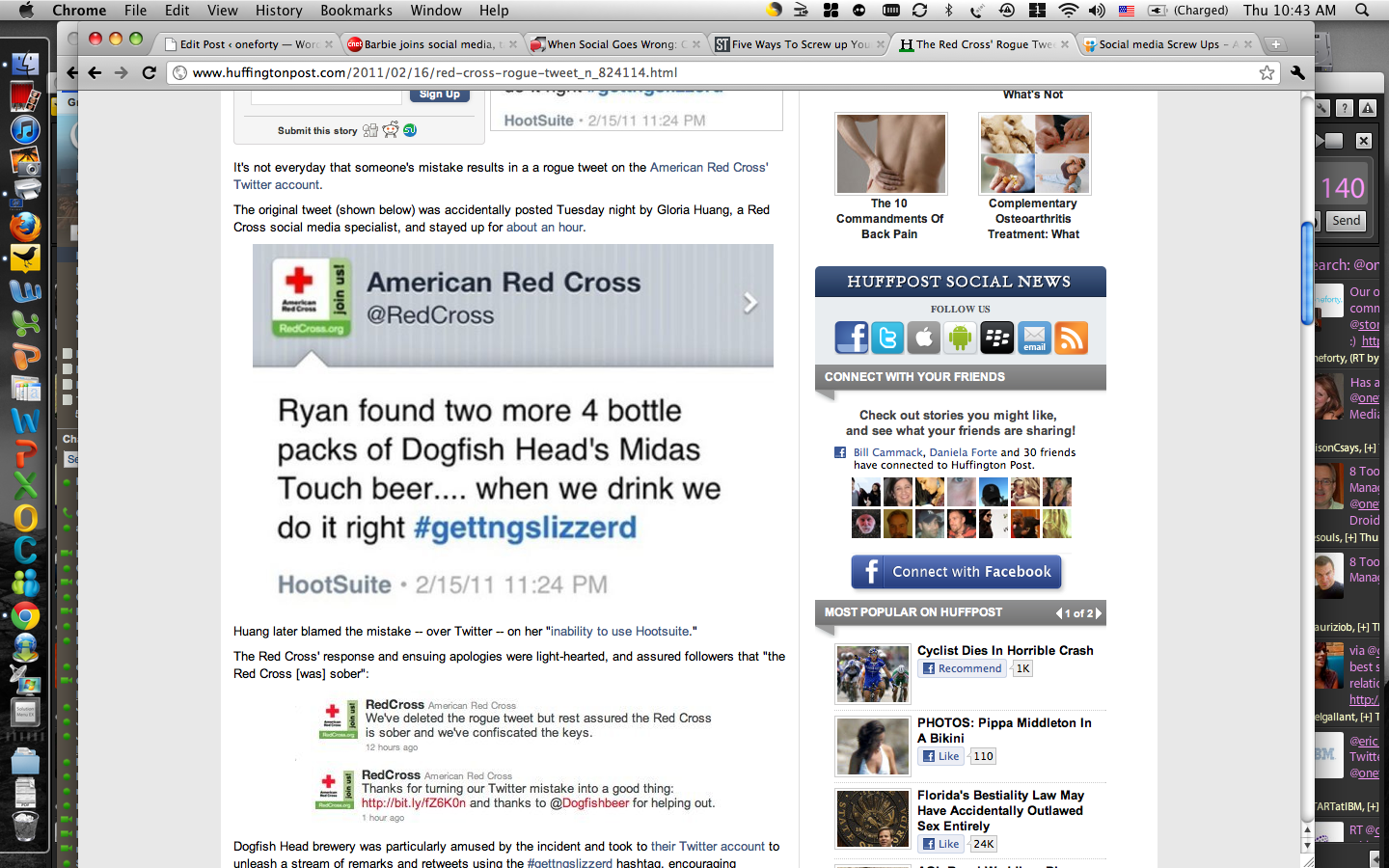
<p>Who hasn&#8217;t seen the <a href="http://mashable.com/2011/02/16/red-cross-tweet/">Red Cross mis-Tweet</a>? It went viral after the mistaken Tweet, but luckily Red Cross handled it well and with grace. The organization assured loyal donors they were indeed &#8220;sober&#8221; but the cool thing was the Tweets and hashtags used (which continued via Dogfish beer) raised more donations. Who knew showing a little human side could raise more awareness and create more ROI?</p>
<p>Despite this, it is best to keep your personal and professional Tweets separate if possible. For example, on my iphone I have both the Twitter app and the Hootsuite app. Not a fan of those apps? Pick and choose which <a href="https://oneforty.com/blog/8-tools-for-the-on-the-go-social-media-manager/">Twitter apps you prefer for on-the-go</a>. It&#8217;s great to do it this way so you can use one for work, and one for your own personal brand. I have definitely made the mistake of Tweeting on the wrong handle, and I find it easiest for me to keep things separate in order to avoid future &#8220;snafus&#8221; like Red Cross had.</p>
<p>&nbsp;</p>
<p><a href="https://pamsahota.com/wp-content/uploads/2011/05/Picture-3.png"><img class="size-large wp-image-1097 aligncenter" title="Picture 3" src="https://pamsahota.com/wp-content/uploads/2011/05/Picture-3-e1305853353659.png" alt="" width="554" height="388" /></a><strong><br />
</strong></p>
<p><strong>2. Who has the keys?</strong></p>
<p>Although the &#8220;younger&#8221; folks know how to use social media because they&#8217;ve been thrown into it at an earlier age&#8230;does that mean they know how to utilize it properly for business initiatives, strategies, and endeavors? Hopefully when making hiring decisions and &#8220;handing over keys&#8221; companies will not just hire on experience of use, but experience of business strategy and implementation. Unfortunately for <a href="http://www.vodafone.com/content/index.html">Vodafone</a>, they realized that after the fact. They had a junior employee handling their community and the young gentlemen foolishly posted a homophobic comment on the brand&#8217;s Twitter page. Immature? Yes. Inexperienced? Most definitely.</p>
<p>Hand over the keys with care, folks &#8212; it&#8217;s <em>just</em> your brand&#8217;s reputation on the line.</p>
<p>&nbsp;</p>
<p><a href="https://pamsahota.com/wp-content/uploads/2011/05/keys-into-hands1.jpeg"><img class="size-full wp-image-1096 aligncenter" title="keys-into-hands1" src="https://pamsahota.com/wp-content/uploads/2011/05/keys-into-hands1.jpeg" alt="" width="250" height="202" /></a></p>
<p>&nbsp;</p>
<p>Ever worry about making a “social media snafu?” That’s a good thing! Being concerned, alert, and watching what you do on your social media channels is better than posting away blindly and not having a “method to your madness.” Time and time again brands have made mistakes, and I will tell you now, it will happen to most of us. Whether it’s minor like a mistaken Tweet or larger like a contest gone wrong, we all make mistakes. But here are some “snafus” major brands have made (aka they’re human too) and you can learn from and hopefully avoid in the future.</p>
<p><strong>3. Customer Service?!</strong></p>
<p>Ever had a customer service rep fall asleep while making a house call? This person sure did! And unfortunately for this guy, everyone else has shared in his “nap” too.</p>
<p><a href="http://www.comcast.com/default.cspx">Comcast</a> realized this type of customer service is intolerable. They ramped up their Twitter Customer service efforts and has since become an industry leader inTwitter Customer Service help. Thus, it is possible to turn things around…and it is imperative to do so as soon as possible! Customer service is key for many brands, and without it consumers loyalty may be MIA. Using Twitter like Comcast does for instant and real-time customer service for their consumers is definitely a great way to go about it.</p>
<p><strong>4. Video gone wrong!</strong></p>
<p><a href="http://www.motrin.com/">Motrin</a> had a promotional video where a woman described how wearing a baby sling is great to bond with her child, it can also cause the mother great pain. This video was controversial with the target market of this promotion. The video quickly went viral…isn’t that great? Not so much when mothers all around are vehemently protesting said video. There were blog posts, Tweets, Facebook updates and more regarding the offensive campaign. Yikes! Motrin shut down the video and apologized, but the video was still out there and had been seen by many.</p>
<p>&nbsp;</p>
<p>Lesson? When focusing on a particular target market and using media that is instant online such as videos, strategize and make sure it truly caters towards that target market. Not all campaigns work, and there will be backlash on many occasions, as consumers all have a voice via social media. It’s the risk brands take in a market where most content is consumer generated. But, it can also be just as rewarding. So brands – strategize carefully and realize what your market wants before you release it.</p>
<p><strong>5. Where’s your target market?</strong></p>
<p>Speaking of target markets…where are they online? Facebook? Twitter? Blogs? It is key for brands to figure out where their target market is. And although it’s good to be present on all the main sites, it’s more important to have a “home base” and focus on where your consumers are listening and engaging the most. <a href="http://www.target.com/">Target</a> made the mistake of not doing such. They ignored a blogger, saying their consumers don’t read blogs. Tsk! Tsk! Was there market research to back this up? Even so, you don’t ignore potential and current consumers and definitely not bloggers who could and should be used for brand promotion campaigns. Old school views are not going to work when the main stream market is consuming most information via new media. In short, find your market online, listen, engage, and monitor.</p>
<p>&nbsp;</p>
<p>In the end, mistakes will happen. But be graceful, be honest, and be human. Brands are not impervious to mistakes and we have seen that above. Consumers want to see and embrace the human side of brands, so let them. Just minimize the mistakes if you can via an exceptional social media management team.</p>
<p><em>Note: this post was originally written for oneforty, which was acquired by Hubspot. </em></p>
<div class="shr-publisher-1095"></div><!-- Start Shareaholic LikeButtonSetBottom Automatic --><!-- End Shareaholic LikeButtonSetBottom Automatic -->]]></content:encoded>
			<wfw:commentRss>https://www.pamsahota.com/uncategorized/5-social-media-snafus-and-how-to-avoid-them/feed/</wfw:commentRss>
		<slash:comments>0</slash:comments>
		</item>
	</channel>
</rss>