How to: Be Successful in Social Media in 2013

Warning – this is not the usual social media success post. Keep reading to get to the root…

So you’ve read about what your brand resolutions should be, what social media goals you should consider, and what to do and not do over and over again…but do you really know what your brand needs to be successful in social media this upcoming year? I have three specific items your brand should have on its checklist (if it’s not on there already)…

1) Hire Well

It’s not just about what you do on Facebook and Twitter and the content you produce, it’s the people helping to strategize said content and how it’s utilized across channels. When hiring your team, consider your culture, your goals, and where you want that team to go. Do these new potential employees fit your brand needs and especially the culture your brand has been developing?

2) Hire Native

I cannot emphasize this enough – hire native, hire native, and hire native. By native I mean – digitally native. Do you want to teach your employees social media and blogging or do you want them to crash through the door with their own ideas, know it like the back of their hands, and challenge your team to think more creatively, think more personally, and bring it to another level? Enough said.

3) Do What You Preach

Unfortunately there are one too many brands who offer advice and preach to be social media savvy and then they don’t hold their own. Eat the dog food and show your brands you are an expert through your actions, and not just your blog posts. Your audience will trust you more, come to your brand for your content, and believe in your brand if you prove it. Just look at Amex who isn’t a social media expert per say, but they started rocking it across social media channels, using guest bloggers to bring in expertise, and offering their small businesses the content they need to be successful in their markets. Now that’s the ticket.


Follow: These Steps to Successfully Market Your Event

Have you ever been to a trade show or a promotional event and you just knew that brand had not prepared enough? Don’t let yourself be that brand. Two words: Plan Ahead.

When it comes to online and offline events, online event marketing is key to success in order to engage your audience pre-event, during the event, and even after the event.

EVENT MARKETING written on blackboard background high resolution

Use your social media presence, your online prowess, and your awesome marketing team to succeed at marketing your event.

Facebook, Twitter, Foursquare, Tumblr, you name it…

You know the age old saying, “be where your audience is”… if your audience is engaging with you heavily on Facebook or Twitter, why not help promote your event to them there? Start early and update as the event approaches with new tidbits they may want to know.

Do you have a cool speaker? Special giveaways? An early bird entry fee? Your audience wants to know! And don’t forget a fun branded hashtag to corral the conversation so you can listen in and so can your followers. That hashtag can be used before during and after the event in order to keep the conversation flowing and get a larger audience to over hear what an awesome event your brand is having.

Event Page(s)

Why pay when you can leverage free offerings. Eventbrite allows for advance planning of events, social media integration, ticket fees and more; a great way for people to easily purchase tickets or sign up for an event online or through their mobile app.

Best part – you can keep track of sign-ups as they happen and alert the attendees as needed.

To learn about the 3 other necessary steps to successfully market your event, check out my full post on Startup Fashion. And leave comments below with questions!


Optimize your Email Marketing Campaign with 5 Tips


Email marketing is an essential part of marketing programs for brands. It allows brands to communicate personally and directly with their audience.

There are the basics that all brands should be implementing into their marketing plans, but then there are those few extras that brands can do to further optimize their email campaigns for increased open rates, engagement with the content, and in turn conversion to a customer (or loyal customer).

Here are 5 tips for optimizing email marketing:

Add Clear CTAs

Adding a call to action (CTA) is common, but not all brands do it properly. Unfortunately some brands forget to make it stand out.  Or they add too many, making the call to action (the intent from the brand) less likely to occur.

Our tip – make the one, specific CTA, stand out. Use a button or a different color…either way ensure it calls out to the reader. In addition ensure the wording on the CTA is relevant and a next step that makes sense.

For example, if you have an excerpt on one of your products, add a CTA that allows the reader to continue reading on the topic elsewhere (online, social media, or via download).

Socialize your Content

This step is crucial to any brand whether they are just starting out or not. Utilize social presence and allow the audience to continue the conversation online with brand specific hashtags ,which apply to the content.

Additionally, allow readers to share your content easily with their friends.  Let them tweet it (have a shortened link already available for them to use), let them share on Facebook, let them pin it on Pinterest, let them +1 it or whatever they may choose as their preference.

The key is, the more shareable the content, the further the content and conversation will go. Hence – more eyeballs on your brand!

email marketing


To read my 3 other tips on email marketing, please read my original blog post for Startup Fashion. Thanks!

Three Second Screen Vendors for Brands to Consider

Tweet Tweet.

Nowadays more and more people are multitasking while watching TV in their living rooms and bedrooms. The laptop is open, the iPad is flipped up, and the smartphone is more of an experience than a phone. People are tweeting, get glueing, checking in, posting, and more. Why only watch a tv show, a sports game, or an event when you can experience more through the accompanying apps?

Shows like Glee and Fringe have multiple hashtags through each episode so people can follow the conversation and join along on Twitter. Other shows, like HBO’s True Blood, have accompanying apps which go deeper into each episode. Then there are apps like Shazam, Get Glue, and Zeebox which bring even more to your fingertips through the app experience for multiple shows and movies.

Shazam: This app is known for “naming that tune,” but now it does even more. Brands and shows can integrate the app into programs and ads to create a call to action for the audience. And now it can also display information about the cast, buzz, gossip, links for trivia, and facts. Look out for the CTA on the corner of your screen – and see what’s in store from your favorite brands, shows, and more.

Get Glue: Like foursquare, fans have an opportunity to “check in” but this time it’s in TV shows. Fans can then reap rewards, chat with fellow fans, and receive “recognition” for their status. It’s basically a fun interactive way to be a part of your favorite shows and movies while watching. With over 2M users, this app demonstrates that brands shouldn’t pass this one by…it has potential to reach viewers where they are interacting during the show and/or viewing experience.

Zeebox: Funny name, great app – it’s like all the viewing apps in one experience. In short it’s an app that pertains to what you want to watch and what your friends are watching. It allows audience members to dig a little deeper into their shows through “zeetags” which appear during certain scenes and allow you to click for more info and insights into what’s happening. And of course it is also integrated with your social channels through both Facebook and Twitter and can even allow viewing parties with friends.

Why it matters? Brands have an opportunity to reach their target audience when they are most engaged with viewing and apps. Brands have the ability to optimize their ads with call to actions, partner with shows, sports games, and live events. For example, the Super Bowl had hashtags in every commercial — although this is a quick and simple CTA and click for engagement, it is a step closer. Brands who know how to move faster and take advantage are shows like I mentioned above. Will your brand be a leader in the second screen experience? Don’t be left behind – give your consumers rewards for engaging with your branded content when they want it and where they already are engaged.

NOTE: This Post was originally written for Social Media Club and my original post can be found here.

Further Reading:


Classrooms and How they Integrate the Latest Technology and Social Media into Teaching

Living in a city where there is a sea of college students, I see more technological gadgets on these young students than sometimes even on adults. They have iPads in the classroom to take notes on, read their books on, and more. However it’s not just technology that’s advancing in the classroom it’s also the acceptance and usage of social media. There are many colleges that demonstrate adaptation and skill in using social successfully to teach students. So what are the benefits of using new technology and social media? Here are three reasons why your classroom should consider the same…


1. Use the technology and Networks They Already Use and Know

Students are already posting on Facebook, reading blogs on Tumblr, tweeting their favorite things on Twitter, and pinning what they love on Pinterest. They know how to use the sites well, and they use it often. Make part of the class participation online participation. It helps those who are creative but perhaps shy in class. For example homework can include keeping a Tumblr blog about a topic which students can comment on and share ideas on. Or if it’s a photography class, how about utilizing Instagram or again Tumblr to host that content. Tip: find the networks that work best for your lesson content (and students).

2. Integrate With Lesson Plans and Learnings

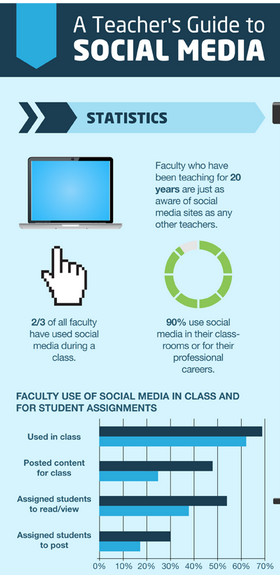
The infographic demonstrates that professors and teachers are already adapting, andeven shows the networks where they can utilize to make their efforts more fruitful with their students. It’s not just about using Facebook and Twitter, but realizing that you can create a wiki for the class and online discussion, and/or pin daily findings on a Pinterest board. There are numerous ways to take advantage, it’s about creating the lesson plan that works for you and your students creativity and desire to engage with the content in places they love interacting. Some students may be hesitant to use their own profiles that already exist – so perhaps create new ones just for class or a location where they can all contribute.

3. Continue and Extend the Conversation Past the Classroom

It is a great opportunity to extend conversation past the classroom. Take the offline, online. For example creating a hashtag for the classroom to corral conversation and extend a topic that was discussed in class, after class has ended. It keeps the students thinking, searching, reading, and interacting with the content.

Last Tip: Remember to  keep content and tools fresh. As we all are well aware, tools and social networks, and apps change, update, and pop up daily. It is tough to keep up but we have to. Perhaps utilize students who work for the school to keep up on the research regarding what’s the latest to help keep lesson plans fresh.

NOTE: This post was originally written for socialnomics and my original post can be found here. 

Further Reading:
http://www.mediabistro.com/alltwitter/teachers-guide-social-media_b25989
http://www.readwriteweb.com/archives/for-social-media-in-the-classroom-to-work-instructors-need-best-practices.php
http://www.zdnet.com/blog/igeneration/the-pros-and-cons-of-social-media-classrooms/15132
http://www.usatoday.com/news/education/story/2012-03-04/facebook-twitter-social-media-classroom/53358382/1

How Top Boston Colleges Are Integrating Social Media

My eighteen year old sister types papers on an iPad, has a Tumblr blog, Tweets everyday, and knows the latest music and fashion via Pinterest and blogs before most. A newbie freshman about to enter a college in Boston – she expects her college to keep up and be ahead of the curve when it comes to social media. She’s only one of many who expects such.

Luckily for her – and many other students, colleges have realized the stretch of road ahead of them and have hopped on by effectively using social and integrating it into their campus and curriculum at a fast pace. Boston being a central hub of college students has led the way with 4 of its colleges in the Top 25 of the Top 100 social media colleges in the United States.

Of those colleges include: Harvard University, Emerson College, Berklee College of Music, and MIT. A few things to note on why they shine when it comes to social media:

Harvard: The Harvard Social Media Dashboard gives a taste of all the University’s efforts in social including up to date videos, tweets, and more from each of its accounts. Each of its different channels and different accounts – whether it’s for alumni, research, a grad program, or the undergrad — have different strategies involved regarding the social output and the content generated for sharing with their audience. Harvard demonstrates that even if there are multiple channels and accounts, social media can be optimized effectively if the effort is put forth correctly.

Emerson College: Their social media classes are one to note of, as there are local guest speakers from the industry, social media strategy projects for local places, and other hands-on applications for students to learn, apply, and utilize as assets.

Berklee College of Music: The Berklee Music Network allows students the opportunity to collaborate, share, and find music, jobs, influencers, and friends all in real time. Music isn’t just about performances on a stage when social media can help lead the way through posting music online and sharing through different channels.

MIT: The Sociable Media Group demonstrates the mix of social and technology at the fringe of discovering what’s next. MIT known for being techy and savvy, demonstrates this even in the socialsphere.

Although Suffolk University was not in the Top 25, it must still be given recognition for its curriculum and conferences. Suffolk put on its first annual social media conference which was about bridging the gap between education and the workforce. It brought the likes of many influencers from around the nation demonstrating that the University was pushing ahead in social media and adapting to what’s new, at a fast pace. Along with its social media classes for undergrad and MBA program, Suffolk is also well on its way.

In short – it’s about ensuring that the students are continuously challenged through the school environment and through a curriculum that is ever-changing — since social media never stands still.

NOTE: This post was originally written for Social Media Club. My original post can be found here. 

Further Reading:

http://boston.cbslocal.com/2012/05/02/local-colleges-ranked-in-top-25-for-social-media/

http://www.studentadvisor.com/top-100-social-media-colleges

http://www.boston.com/yourtown/news/downtown/2012/07/emerson_bu_harvard_among_top_

5 ways to use social media apps to capture your summer vacation

Summer brings many enjoyable times each season including beach trips, family time, bbq’s, and much more. The tough part is remembering to capture all these great times so you can recall and reminisce later on. Luckily there are many creative ways to do so effectively, quickly, and easily with the touch of a smartphone app.

Make it Fun

1. Instagram 
Capturing photos and making it easy for your loved ones to access, comment, and share has been made simpler through social networks like Facebook. However, there are other networks and applications, which allow one to be more creative with images such as Instagram. Instagram offers cool filters to allow pictures to be more vivid and unique. Best part it integrates smoothly with Facebook and Twitter for easy sharing to your normal channels.

2. Tumblr
Want another place to share your adventures throughout the summer? Consider a simple to use Tumblr Blog. It’s easy to set up, maintain, and integrate with your other channels. My favorite part is that you can take a quick picture from Instagram, share it to your Tumblr blog, and then share directly to Facebook or Twitter. What could be easier for sharing all those images from your road trip to the beach?

Share it with your inner circle

3. Path
Sometimes Facebook and Twitter means sharing with too many people, even those we may have “friended” or allowed to ‘follow” us can seem a bit much at times. Why not keep it simpler and more private with Path? Path allows a maximum of 150 friends, cool photo filters, location sharing, and more. And when you want to share to your larger circles, you can with integrating with your Facebook and Twitter too.

4. GroupMe
Taking a trip with your friends or want to share instantaneously your thoughts on what’s going on? Images from your hike, the great sunset, or the food and drinks you’re indulging on? Share with your inner circle via groupme and have a conversation right then and there. Not sure what dress to wear to the summer wedding? Ask your friends all at once via this easy messaging app.

Stay Organized

5. Evernote
Being organized isnt’ just for the office. Evernote allows easy integration with saving notes, images, and more so you can stay organized with packing lists, things to do on your trip, itineraries, hotel and direction information, and more. Why worry about that address you need when you can access from Evernote from your laptop, tablet, and/or smartphone. Could it get simpler? I think not.

Although these five apps are well known and many people use them already, they are sometimes overlooked when it comes to trips, great times, and sharing adventures with friends and family. Next time you set off on your next summer trip, don’t forget to capture it so you can look back on it later. All from your smartphone…

Ready, Set, Click.

Note: This post was originally written for Social Media Club, and my original post can also be found here. 


Image Credits:
http://www.cc-chapman.com/2012/why-i-love-path/
http://evernote.com/evernote/
http://demopit.com/2011/01/21/groupme-lets-you-effortlessly-group-text-with-friends/
http://ralphvelasco.tumblr.com/post/24299130196/ill-be-in-this-city-tomorrow-can-you-guess-where
http://pamsahota.tumblr.com/page/2

Three Examples Why LinkedIn is stronger than Facebook

Facebook may have over 910 million users, but it still has stealthy competitors such as LinkedIn. LinkedIn may not be where most individuals share their photos, check their newsfeed or share their daily status updates — but it is where businesses can flourish, B2B kicks butt through lead generation, and  ”likes” can have more weight.

Businesses Flourish

Facebook is a great place for businesses and fans to share content, but the types of content vary from all different spectrums: from Justin Beiber to brand news to business strategies to the Red Sox to pictures of  cat. In short, business content that is relevant to marketing, B2B, finance, etc may get lost in the clutter that is the Facebook news feed. On the other hand, the content on LinkedIn is largely related to marketing and business, and has a higher chance of being seen on the channel. It is purposefully designed for business-minded folk who want to share relevant content. In addition, it is a great platform for brands to distribute similar content and where many followers will look to find information on a brand, what they offer for a product/service, and the content related to it.

B2B and Lead Generation

So it is evident that LinkedIn is great for business content and businesses. But what else? “David Meerman Scott stated that LinkedIn’s conversion rate is now 2.60 per cent, less than what it was back in January, but this is far greater than its nearest rivals Twitter and Facebook, which has 0.67 per cent and 0.39 per cent respectively.” So what, you ask? In short, LinkedIn has competitive percentages when it comes to B2B lead gen due to the ability to target content, optimize for SEO, focus CTAs and utilize both company page and groups.  In addition, those who are visiting LinkedIn are visiting in order to post, read and/or comment on business content. The leads are prime for the picking.

“Likes” Have More Weight

On LinkedIn, people are more careful on what they post on their site, who they “link” to, and what they like, comment on and/or share. It is a site where people are judged for who they are career-wise. In short, if someone “likes” your post or comments on it or shares it — it holds greater value than it would on Facebook and Twitter where Likes and ReTweets are a dime a dozen normally. A recognition on LinkedIn = how many Likes or ReTweets? That’s still up for debate, but in my opinion, LinkedIn has a bit of a lead.

Last piece of Advice

LinkedIn may be a great place to invest in for businesses and those that are business-minded; but it is also easy to goof up if relevant content is not posted appropriately. Invest time to research first, target your content appropriately and grow your page within the channel over time. It is not an overnight success, but the trick is to maintain quality versus quantity.

Note: I originally wrote this post for Socialnomics – my original post can be found here

Additional Reading

http://thenextweb.com/asia/2012/02/21/growing-faster-than-facebook-linkedin-passes-1-million-members-in-indonesia/

http://writingontheweb.com/2012/02/21/the-pros-of-linkedin-vs-facebook-for-professionals/

http://www.simplyzesty.com/social-media/linkedin-4-times-better-than-facebook-twitter-for-b2b-leads/

https://blog.hubspot.com/blog/tabid/6307/bid/30030/LinkedIn-277-More-Effective-for-Lead-Generation-Than-Facebook-Twitter-New-Data.aspx

http://www.forbes.com/sites/ciocentral/2011/02/16/why-linkedin-is-more-valuable-than-facebook/

http://www.donhalbert.com/10-reasons-why-linkedin-is-better-than-facebook-and-twitter/

5 Companies Who Lead the Way in Social Media

Social Media…a not so new concept, yet one which can still allude many brands if they do not strategize their content appropriately for each channel in regards to how it fits their brand. But we’re not here to criticize, we’re here to learn from the ones who take advantage of social media and elevate their brand to another level.

Facebook
Victoria’s Secret converted to the new Timeline ahead of the curve and wow does that timeline grab your attention. With over 18 million fans and over 200 thousand people talking about the brand…you have to take a second glance (not just for the pictures). The brand took advantage of the picturesque platform, made it interactive for fans to engage with the contact, offer coupons, notify consumers of real-time sales, and more. It captivates not only the female audience but the male audience to imagine, dream, and bring to reality what could be. The story has been unfolded, and the brand fully utilized Facebook Timeline to do so.

Social Media Case Study: Victoria Secret was ahead of the curve with Facebook’s timelineTwitter
Zappos may be an obvious win here…but perhaps it’s because they really do take their brand marketing to heart. The brand has been humanized by their CEO, Tony Hsieh, who lets his own personality shine through the brand name. How many CEOs do you know who take the time to do such, especially through social media?

YouTube
Blendtec, demonstrates with 190 million views and 400 thousand subscribers, that even a blender can be entertaining. Who knew?! The brand took a brave yet awesome take with social content…they leveraged humor and experimentation to make their videos fun to watch and create a viral effect. I am impressed by their leverage of humor, as it is way easier said than done. Would you blend your iPhone? Watch them do it instead!

Early adopters

Burberry, a brand known for evoking desire and lust for fashion, transcends their fashion leadership to the social sphere. They adopt early, and adopt well. While doing research a while back for the Google Plus brand pages, I saw that Burberry was one of the first to take advantage of the channel and demonstrate it could bring style and allure even to a channel that was too new to be adopted by most at that time. My favorite part? The GIFs used for the images…catches your eye before you even get to the heart of the content.

Keeping it local

Four seasons known for its luxury and decadence, takes a simple and relaxed approach to its social endeavor. The brand chose to simplify and localize its Twitter and Facebook channels. There is a fan page and twitter account dedicated to individual hotel locations in order to optimize the care needed for local guests and the language in each region/city. Luxury care simplified for local effort.

Takeaway

It’s about a few things:

1. Listen for the latest greatest ‘shiny toys’

2. Don’t just jump in to all of the social channels; Gauge which channels are going to best fit your overall content strategy and help to amplify it

3. Use social media to augment your marketing efforts in a real-time, community driven effort

4. Humanize the brand

5. Show your consumers you are there for what they need; not what you need

6. Make it fun; see: Blendtec example

Note: This post was originally written for Socialnomics and can also be found here

Additional Information:

http://mashable.com/2009/02/06/social-media-smartest-brands/
http://mashable.com/2009/01/21/best-twitter-brands/
http://www.socialmediaexaminer.com/9-companies-doing-social-media-right-and-why/
http://thenextweb.com/socialmedia/2012/03/20/luxury-brands-using-social/
http://thenextweb.com/socialmedia/2011/07/04/meet-the-top-20-brands-on-facebook/

Three Creative Ways of Using Google+ Hangouts

There are so many shiny new toys in the social media sphere…sometimes we can’t keep up. Google has a tendency to test out new ideas (remember Google Buzz?) and this time around they have spun out Google Plus Hangouts. It’s an opportunity for individuals or businesses to utilize this virtual “hangout” to communicate with others in their community or business via video. The only disadvantage that appears right away is the restriction of 10 people per hangout. However, when it comes to meetings and having the chance to build a deeper relationship among community members sometimes fewer can be beneficial.

How individuals are taking advantage of Google+ Hangouts

Individual users are being creative and using hangouts for a face-to-face experience for hobbies like photography and cooking. It is a simple way to make your personal life more interesting with people who share your interests. It’s also an opportunity to join communities that you may not have realized existed…whether it’s with people locally or not. Google Plus Hangouts allow individuals to stay in closer touch with their circles and/or to expand them in a more personal way.

Possibilities for Businesses with Google+ Hangouts

1. Dell 

It’s been reported that Michael Dell of Dell Computers has been very interested in Google+ Hangouts, especially for the ability to group video chat in order to assist customers with tech and customer support needs. Unfortunately the capabilities do not work with Dell currently and the restriction of 10 users appears to be a hindrance as well. For now it appears it’s a no-go but Dell hopes that will turn around one day so they can utilize the technology Google has offered with Hangouts. The company believes video chat for tech support could lend a great hand in real-time and personal support for their customers.

2. NBC Philadelphia: 

Television has definitely jumped on board and realized that social media doesn’t have to be a threat to news-telling, but a great cross-promotional tool. NBC Philadelphia has recently used Google+ Hangouts for both weather and even more recently a chat with President Obama. The weather team hangout was to allow viewers to chat with the team up close and personally and ask any weather related questions they had. This demonstrates the team giving a closer look behind the camera and showing an even more human side to the team.

Even more recently, NBC Philadelphia hosted a hangout with President Obama. Unique? Yes. Cool? Definitely. The President spoke live and answered submitted as well as live questions during the hangout. It was an opportunity for some to ask questions that had perturbed them such as employment issues. Social media can be a tough venue, especially with all the different opinions and questions that can easily rise. I commend the president for taking the chance, opportunity and demonstrating his willingness to be there on a more personal level.

3. Tearfund 

Tearfund, which is a nonprofit known for disaster response and advocacy, used Google+ Hangouts as an internal communications tool. It helped their team talk to staff who worked from home, or were off-site. Hangouts assisted Tearfund in doing briefings, staying on top of their objectives, and communicating more regularly with their teammates.

In short, there are many possibilities to interact, grow within communities, enjoy hobbies, have meetings, interviews, and/or build relationships on a more intimate and personal level. There are definitely other tools out there, which have similar functions, but being that Hangouts is a part of the Google ecosystem of Gmail, Apps, and more…it just makes it that much easier.

What would you use a hangout for? How would you use it for your business? 


Note this post was originally written for Social Media Club, and the original post can be found here

Sources:

http://www.tearfund.org/en/about_us/how_we_work/

http://9to5google.com/2011/09/29/black-eyed-peas-hosting-backstage-hangout-via-google-hangouts-tomorrow-night/

http://www.google.com/+/learnmore/

https://plus.google.com/115181052736294416606/posts/TrJuQDBwjZS

https://plus.google.com/115181052736294416606/posts/YNGiC9V4XLn

http://www.huffingtonpost.com/2012/01/30/obama-google-plus_n_1242816.html

http://www.reelseo.com/dell-google-hangouts-video-chat-customer-service/

Keep your New Year’s Resolution: 5 Ways to Find a New Job with Social Media

So many New Year’s resolutions, so little time. The New Year is already flying by, and it’s no time for slacking off. Many individuals have
the desire and resolution to find a new job that will make them happy and put them in the right path for their desired career aspirations. Need some help?

Here are five great ways that social media applications can help you search better and also stay organized in your job search…

LinkedIn: In short, if you aren’t on LinkedIn, you’re already way behind on your job search. Job recruiters post on this networking social site, look through your profile for keywords related to their requirements, and filter through profiles in order to see who may be a good match. So here are some ways you can take advantage of this perfect social site for finding that perfect job you want this New Year.

Profile Picture. Make sure you use a single head shot for your profile picture so people can clearly see who you are. Preferably this wouldn’t be the same picture you have on Facebook where you may be friends at a party or bar. Think more professional.

Fill it out. Your profile should be filled out at least 90% to show your education, previous employment, and details of what skill sets you possess and could bring to the table.

Links. Take advantage of the social real estate. Use those link spaces and promote yourself. Have a blog? Show it off! Active on Twitter? Share your handle.

Recommendations. I could not speak more highly about having some recommendations…even if only a handful. Other people’s praise is not only golden, but a hot commodity when it comes to scoring a new job.

Job Search Tool. The best part of the LinkedIn search tool is that when you find a job match via your keyword search (which can be customized by location, etc) is you can see who in your network has a connection to that job prospect. The personal connection could just be your ticket to a new job. Use it!

Twitter: the micro-blogging site is an essential search tool that many overlook. Although it may seem intimidating to some and useless to others, it can be a rich resource to many, especially those searching for a new job. Key tips:

Follow the right people. Find the people in your territory who are prominent companies you want to follow, people from those companies, and those who post about jobs often.

Set up search feed for key words. Set up different search feeds for keywords you want to monitor for jobs you’d like.

Monitor. Don’t just set it and forget it. Monitor well and monitor often. You could also use Topsy in order to monitor keywords and have them sent to your Google Reader for convenience sake.

Blog: Having a blog and searching industry blogs can be essential to the job searching process. Here’s why…

Have it. Having a blog is like an investment. It can only help you in the long run. The key is to build one which is on a good domain (preferably one related to your topic or name), has a key focus, and shows you are an expert in that area – in turn showing your future boss you know your stuff.  

Search away. Many blog posts also offer job postings on the topics they focus upon and in the areas they are in. For example, Mashable is frequently posting open jobs. Subscribe via your Google Reader, Email, or check out their Twitter feed on a regular basis. Can’t hurt!

Google Plus: Just because it’s a new social network doesn’t mean it isn’t important and useful for a job-searching tool. Google is well known for its great SEO capabilities and is key when it comes to search. Build your profile, start following key people, and place them in the appropriate “circles.” It can only help to be more visible as long as you are following the right people, providing valuable content, and networking your butt off.

Google Alerts: As mentioned above, having searches set up is key. Google Alerts are essential in saving time and not going back and forth all the time. You can easily set up key search terms and then have them sent to you via email or via a RSS feed to your Google Reader (or Feedly) in order to check it at your convenience.  

Bonus: You are searching through job search sites, social networks, and Google-ing away, but so are recruiters. At the very same time they are also searching for “you.” So why not make it easier for them to find and reach out to you? Make your social sites job viewer friendly. 3 tips:

Headlines: Describe what you’ve done, what you want to do, and what you are good at.

Photo: Have a clear photo that is just you and preferably more of a headshot.

Share your expertise: Demonstrate what experience you’ve gained in each position you’ve held, accomplishments you’ve achieved, how you’ve assisted your companies to ascertain revenue goals, and more.

Still unsure about social networks and how much they can help? See below for a clear-cut example that companies use social networks just as much for recruiting too.

To check out more, visit: http://mashable.com/2011/08/28/social-media-recruiting-infographic/

Please note: this post was originally written for Social Media Club and you can find the original post I wrote here.

[Above Image Credit: http://mbahighway.com/2011/10/top-10-mba-job-search-websites/]

Sources:

http://laurenkgray.com/2011/03/02/job-hunting-via-social-media-using-linkedin/

https://pamsahota.com/social-media-at-work/how-to-find-a-job-using-social-media/

http://mashable.com/2009/01/05/job-search-secrets/

http://www.margieclayman.com/30-tips-on-how-to-find-a-job-using-social-media

http://mashable.com/2011/07/24/google-plus-jobs/

http://mashable.com/2011/08/28/social-media-recruiting-infographic/


Seven Reasons You’re not Using Social Media Correctly to Generate Leads

Social media is a great inbound marketing tool that allows businesses and marketing teams to interact with prospects, cater to customers, promote their content, and yes, generate leads. When a business uses social media right, prospective customers have the opportunity to access great content and information via a platform they already populate and actually want to gather said content and information.

Additionally, when prospects do “bite,” many of them are willing to provide their contact information, click to obtain more valuable content, and then come back for more, illustrating the concept of effective use of social media for lead generation beautifully. And a good chunk of B2B marketers are on top of this: According to BtoB Magazine, 48.9% of B2B marketers who use social media say use it for lead generation, making lead generation one of the top applications for the use of social media. Unfortunately for some brands, they don’t always realize there are true tactics in order to use social media effectively for lead gen, and they approach their social media presence blindly.

To make sure you’re business is appropriately using social media to boost its lead gen efforts, check out the following list to ensure you’re not making any of these rookie mistakes.

7 Ineffective Ways to Generate Leads From Social Media

1. Not being where your target customers are. It’s not important to maintain a presence on just any social media network in order to engage with potential and current consumers; you have to be where they actually are. If you are posting content and updates blindly to Twitter, but members of your target market aren’t present there, what’s the point? The first step in effective use of social media for lead generation is to research and determine which social media sites your target audience is active on a regular basis. That way when you do share content and information, you can know you’re working to build awareness for your blog, product, service, and other types of content you offer on a regular basis. Awareness is a key preliminary stepping stone for lead generation, since prospects likely go through a period of learning more about your business and deciding whether or not they should research your company further.

2. Not providing valuable content. If you’re just pushing out content about your product and why it’s so “awesome,” more than likely, people will not want to share or engage with it. If someone is following your brand on Facebook, it’s probably to see what valuable content and offers you can offer them. Rather than product-focused content, focus on content rich with tips and tricks which can help to relieve your target customers’ pain points. When you target the content you’re offering to the different marketing personas you have defined for your business, then your prospects will be much more likely to engage with your brand and therefore, more likely to complete a lead-capture form for a piece of your content. In short, providing targeted, useful content will help you generate more qualified leads who may genuinely be interested in what you have to offer.


This post was originally written for Hubspot. To continue reading on the 5 other areas that are ineffective for lead gen through social media, please read my full post here: https://blog.hubspot.com/blog/tabid/6307/bid/29111/7-Reasons-You-re-Not-Generating-Leads-From-Social-Media.aspx#ixzz1exWAVlTg

How To Use Social Media to Generate and Nurture Leads

Generating and nurturing leads is a key part of campaigns and the sales cycle for a business looking to kick butt and make a good profit. But did you think social media would be a great way to nurture those leads? Social media is the key to inbound lead nurturing because it allows people to come to your brand on their own accord. I am not saying you shouldn’t utilize email marketing and other forms, but social media can be a great additional source, and also to use in conjunction with your other avenues for lead generation.

3 key methods to lead generation and nurturing

1. Participate in the Convo

More than likely there is already chatter about your brand on the Internet. The key is to find it, listen often, and participate in it.

Find and Listen: You can utilize a tool as simple as Google Reader (or Feedly) in order to hear what your consumers, competition, and others are saying regarding your brand, product, or service. For example you can take RSS feeds from Topsy, Twitter, Facebook and have them all set up in your Reader. Additionally you can set up keyword alerts for your industry. Way simpler than checking every day on what’s out there or getting a billion email alerts.

Listen more: The key is to find out what the key themes are that your consumers and competitors are talking about on these social platforms and across the web. What are the pain points? Then you have an avenue to talk to them about and engage on a level that they want to be engaged on.

Engage: Don’t talk to, but talk with your consumers. Are the majority wishing they had a service that helped them do X better? Or had tips on how to do Y in a shorter amount of time? Perhaps you already have content on how they can do just that. Provide a link to a source of content to help them, rather than just selling your service right away. In short, this will help build awareness, start a conversation, and lead them through the funnel.

2. Share some Content

From part one you have begun to listen to your consumers regarding what they have to say, what they want, what they don’t want, and what information they could use more of. Now what?

Create Valuable Content: Focus on their pain points and offer content on what will help relieve those pain points. For example, if your brand is a software service and your potential consumers are having a hard time with efficiency, perhaps write some whitepapers, blog posts, or record some webinars which give them tips and tricks to increase efficiency (and of course you can throw in a little plug about how your product is the key to that efficiency).

Provide Valuable Content: So now you have this content, now what?

  1. Join the groups where your target consumers are in Facebook or LinkedIn.
  2. Use the hashtags they are using on Twitter.
  3. Share your content in these groups, on your Facebook Page, through your Twitter stream, and on your LinkedIn group.
  4. Make sure there is a link that leads these consumers directly to this content on your website.
  5. If they keep clicking, and look for more info regarding XYZ, now you know what more to provide these specific consumers. You can nurture these leads further all because you listened first, and engaged second – and on the social media platforms where they like to speak and engage (not where you think they should).

3.  Measure, Measure, and Measure some more

Did someone say the word “measure”? You may be tweeting, commenting, sharing, and chatting online with your consumers, but how much are they engaging with you? How often are they clicking on your links? Are they converting? Key areas to measure to see if you are utilizing social media to truly generate and nurture leads include:

Measure the visitors

  • Analyze how they got to your website or blog. Was it through a bit.ly link used on Twitter? Was it through a Facebook group post? Track your links and see where the majority of your consumers came from.

When did you see the most / least traffic

  • You can see which campaigns on social worked the best or least and repeat and further the better ones, and perhaps drop the lesser ones.

Conversion

  1. How many just perused (and what did they look at)?
  2. How many clicked, and converted? What did they look at and view before they converted. Was it the awesome webinars you record each week? Now you know what works and what doesn’t for your target audience.

Although social media is not going to get your lead to convert by itself every time, it is a great bonus tool to use in your nurturing process. Combine it with your email efforts, and make sure your emails and newsletters all have your social buttons on them for potential and current customers to follow and fan when they wish.

And….don’t forget to also keep in touch after you have converted those leads into customers. There is the after sale process part that is very important. Customers want more information on training, tips and tricks, and more. And if they are avid social media geeks, they may be subscribing to your Facebook feed in order to keep up with the latest and greatest from your company.


Five Google Plus Tips and Tricks for your Personal Brand

Like many people I was definitely hesitant at first about whether or not to utilize Google Plus? Another social platform? Another place to have to keep up with? But since I am a Google Fanatic with my Gmail, Docs, Calendar and more…and not to mention a complete digital geek…I had to join. Here are a few tips I’ve learned along the way from my own ventures and others who have shared…

1. Profile Picture

As we all know not all social networks make it easy for you to upload your avatar pics. Google Plus can have issues with resolution when uploading. Suggestion: make sure the picture you choose has higher resolution so it’s more clear.

2. Manage your Contacts

So many people, so much to share, so much hassle? Google Plus allows you to make it simpler so you can share with whom you want to share, when you want to share. For example, you can make one group for family, one for close friends, one for coworkers, and another for industry experts. Therefore you can share pictures of your dog with friends, while your blog post with others in your industry. Or whatever suits your fancy.

3. Sharing with Relevant Contacts

As stated above you can decide how you group your contacts so its easier to share what you want to share. Here I am emphasizing that this is great so you don’t share irrelevant content to all groups. For example your close friends may not care about a post related to your job, or vice versa. If you want the right exposure for that cool “tip post”….share with those who will actually respond and comment and be excited to read it. Share and share relevantly.

4.  Cutting Through the Noise

Too many items in your feed? Tired of seeing certain people post about the same old thing? Turn down the “volume” and cut through the chatter. Mute a post from the notification window. Simple, and way more manageable.

5. Take it on the Road

Want to keep up with your Google Plus circles but not at your computer as often?There’s an App for that! You can also get notifications via text on notifications.

Bonus!

Want to know how it measures up against Facebook? Check out this sweet Infographic…

Who are you? A google plus fan? Still an Avid Facebooker? Or both?

Note: This post was originally written for Socialnomics

Top 5 Social Media Tools Companies Use

We all know the three most popular social media apps in our toolkit are: Facebook, Twitter and LinkedIn. But what else are companies using to have an edge and be more efficient and productive in their social media efforts? How are they actually Tweeting? How are they monitoring? Here are five tools that were found to be popular and widely used among brands and businesses!

A. Cotweet

What’s awesome: Web-based social media engagement, management and reporting solution that helps companies of all sizes engage, track and analyze conversations about their brands across the most popular and influential social communities today, Twitter and Facebook.

Not so awesome: There can be issues with lag time in Tweets being posted and there is a lack of autofill of Twitter names for tagging in tweets and hashtags.

Companies that use it: Whole foods

Price: Standard for $600 or $1500/month for the Enterprise Edition (unlimited users, unlimited accounts). This is what I’ve read through other sources. The website does not tell exact prices unless you consult a sales agent.

B. Radian6

What’s awesome: A social media engagement tool that also lets you to find out who the top influencers are for your product/service category along with tracking conversations and engagement impact on your brand.
Not so awesome: The CRM capability would be great to have and thanks to their new integration with Salesforce, it is possible now via the integration.
Companies that use it: Dominos
Price: Radian6 dashboard pricing starts at $600 per month. They also offer a 50% discount for registered and qualified charitable organizations. Contact Sales for more info.

C. Tweetdeck

What’s awesome: Ability to listen, monitor, respond, and engage efficiently and effectively on your social platforms from one dashboard or on the go.
Not so awesome: Lacking Google Analytics integration and the ability to save draft tweets to schedule for later (why many have switched to hootsuite).
Companies that use it: NBC
Price: Free

D. Seesmic

What’s awesome: You can monitor mentions with ease by utilizing one dashboard for all your social platforms. Cool perk? Integration with Evernote and other nifty apps!
Not so awesome: Lacking theme support and push notification features for smartphone app.
Companies that use it: Samsung
Price: Free

E. Klout

What’s awesome: Determine your “influence” and compare/contrast with others in order to see how far your brand reaches and how your social networks like Twitter and Facebook impact that influence or target larger influencers in your target market to spread the word. Cool integration with Google Reader for blog influence too!
Not so awesome: Measuring of ROI regarding perk program for influencers appears difficult
Companies that use it: Audi
Price: Free
This post was originally written for Socialnomics

Myth Buster: Social Media is Free

Many individuals who are just getting into the game of social media have heard social media is free or cheap due to the fact that many platforms such as Facebook and Twitter are free to sign up for and maintain on a daily basis. Free to sign-up, but not exactly free to maintain.

“A significant 58% of marketers are using social media for 6 hours or more each week and 34% are 11 or more hours weekly. It’s interesting to note that 15% of marketers spend more than 20 hours each week on social media.” (2011 Social Media Marketing Industry Report, Social Media Examiner)

As the old adage says, “time is money” and time is not free. Marketers who want to increase brand awareness and engagement do not spend just 10 minutes here or there Tweeting and posting. They take the time to listen to what people are saying regarding their brand, what the competition is saying, what consumers are saying regarding the competition, and more. Then they take the time to respond, question, and comment in a relevant manner.

“Those with more years of social media experience spend more time each week conducting social media activities. For example, 63% of people with 3 or more years of experience spend more than 10 hours a week doing social media activities.Only 41% of those with 1 to 3 years experience spend that much time.” (2011 Social Media Marketing Industry Report, Social Media Examiner)

Conversation in social media is not an overnight success like winning the lottery. It takes time, effort, and in turn money, spent on the people who “manage” the brand online. Those with experience in digital marketing realize the more time and effort spend in social, the greater the reward. Newbies, take note.

This was post was originally written for Socialnomics.

How to: Make and Maintain a Blogging Editorial Calendar

Too much content to create, too little time? This is when having a blogger staff and an awesome editorial calendar are key. Not only are they key but vital. As a freelance blogger as well as a marketing communications manager I definitely have a few tips on the topic. Here I share a few of my most helpful tips on how to create an efficient and user-friendly editorial calendar for your every-day use!

What to use?

In my opinion an Excel spreadsheet is easiest in order to be organized with a table/chart and to be able to alter/revise as needed. However, I also advise to use a Google Doc version (or upload to Google Docs) in order to share with bloggers and have the ability to easily revise and show revisions without having to constantly email out. Efficient and easy to use.


How to divide it up?

Up to your own Type A and/or OCD nature. However, I suggest columns which include the following:

1. Category

2. Topic

3. Due date

4. Author

5. Post date

6. Status (aka under revision, etc).

Scheduling Bloggers


1. Ask them to pick a weekly or monthly due date (and be stern about deadlines)

2. Schedule out posts according to frequency of blog posts and category/topic type of said posts

3. Always have some extra content in case you encounter a “lull”

4. Don’t forget to schedule time to review/edit/revise

5. Make sure publish day/time is a good time for readers – aka 9am with coffee not 5pm on a Friday

Bonus Strategies

1. Hard part: finding the right bloggers who can produce great valuable content that people actually want to read. Not only do you need awesome bloggers but you need to find out what your target market is searching for in regards to content in your category. What keywords they are using and what they’re reading. Inboundwriterallows you to do just that! How? Here are the perks:

  • You can explore what words they are using when searching for content or while sharing content via social media.
  • Just provide Inboundwriter with a few keywords and websites that relate to your topic or content category
  • Inboundwriter looks through search engines, social media sites and specified competitive websites to determine words and phrases directly relevant to your topic of choice.
  • Based on this real-time research, Inboundwriter recommends the best words that will increase your content popularity and competitiveness for each specified topic.
  • And it’s Free!


2. Developing a content strategy which aligns with your business/marketing strategy. This takes more thought and should be planned out with your CMO and/or VP of marketing in order to be most effective.

3. Make a bank of blogging content ideas for bloggers to choose from and/or add to. This saves time and make bloggers excited about the topics they write about. Need help thinking of topics for the bank? Check out these awesome blog topic ideas for your brand! Remember, the more excited your bloggers are, more likely the better they write, and in turn your target market will see the value.

4. Tip: It’s not always easy to review, critique and revise blog posts of your blogging team, especially if they may technically be your superiors in your company. However, you must remember that in this area of the company, it is your job to critique and be honest. It’s ok if you “rip apart” their writing because it is for the benefit of the brand. In addition, it teaches your blogging team the best tactics, learning their voice in writing, and within time it’ll be like clockwork. Critiquing isn’t always easy, but it’s essential to creating valuable content for your target market.

5. Have a social media policy? Community guidelines? Why not have editorial guidelines to make things more unified and efficient too? For example, in your guidelines you should/could include criteria for hyperlinking to previous posts, pages of your website, images, embedding videos, word count, style such as headings and bullet lists, and whatever else suits your fancy.

6. Cool new tool: WordPress editorial calendar plugin! Although I suggested Excel and Google Docs above, there is a new tool available for you WordPress junkies! The new plugin is an editorial calendar, which “gives you an overview of your blog and when each post will be published. You can drag and drop to move posts, edit posts right in the calendar, and manage your entire blog.” Awesome, right?

Final Thoughts

Experiment! You need to give it a shot, try out a calendar, and see what works for you and your organization. Adapt to what works best and create that awesome content!

Note: this post was originally written for oneforty, which was acquired by Hubspot. 

5 Helpful Social Media Tools That Integrate With Salesforce

Hooked on your social media apps? Need your Salesforce? What if they were integrated to make your brand management easier and your day a little saner? We all know that it isn’t always easy to be efficient as a social media manager so I believe an integration sounds awesome, especially for lead generation, tracking, and deeper analysis.

Here are five very useful tools, which all integrate in some capacity with Salesforce:

1. Radian6

Social media metrics are key in order to manage your brand online and make sure your social media efforts are matching up to your marketing goals and strategy. Radian6 is great for those metrics and see which content is generating buzz online and traffic to your website. With this integration with Salesforce now the two apps bring users the ability to see which content is from which consumers/clients/prospects, and allowing the ability to then add these new contacts and leads with just one click! Efficiency and lead management = pretty awesome.


2. Cotweet

When apps and tools make our lives simple it is just like taking candy from a baby.Cotweet is just this simplicity with its integration with Salesforce. Cotweet which allows one to engage with consumers/clients/prospects by expanding reach beyondTwitter to Facebook. And now with the integration,  brand managers can easily  do a “one-click exporting of tweets and Facebook posts to Salesforce.” This new upgrade will also allow for deeper analytics and reports, allowing for us awesome marketers to track ReTweets, and more and then export this data to Excel and track buzz and influence over a certain amount of time whether it be weeks, months, or years.

3. Seesmic

Seesmic is yet another great social media management tool for tracking, monitoring and engaging and has also integrated with the likes of Salesforce. One cool example of this integration is if someone tweets about your product/service category (asking a question or making a comment), this becomes an automatic potential opportunity and is captured directly into Salesforce. This automation is not only helpful but great for lead management as well as potential conversion from prospects to customers.

4. Zendesk

Zendesk now allows brand managers to view Salesforce CRM information in a customer profile directly in Zendesk. You can also view real-time Zendesk tickets fromSalesforce and view/categorize by status, priority, or type. Additionally there are reports on Salesforce cases and Zendesk ticket data that is consolidated for viewing and analysis ease and efficiency. Value prop: dig deeper into Salesforce‘s advanced analytics to make better marketing and business decisions.


5. COMING SOON: Hootsuite

Last but not least, Hootsuite will have an integration, SOON!

I must admit I regularly use Hootsuite and am looking forward to seeing how this upcoming integration benefits the brand I manage on a deeper level. From what I’ve learned thus far, the Salesforce integration will allows marketers to utilize the information passing through Twitter including: sift through tweets to find relevant conversation, capture and monitor conversation by creating a record of specific Tweets to track, and funnel relevant solutions from the Service Cloud knowledge base into a Twitter post. Two great tools working together for more efficient and relevant content management and engagement with consumers.


Five great tools, now even cooler due to the integration with Salesforce. You know you’re pumped….so what do you have to lose? Try it, have fun with it, and tell us what you think, like, dislike, and any questions you have.

This post was originally written for oneforty, which was acquired by Hubspot. 


Teaching your Client the Art of Social Media

Have clients? Need to demonstrate to them the value and efficiency of learning and capitalizing on social media as part of their business strategy? Not always so easy right? I’ve provided some helpful tips in order to help you help your clients transition into utilizing social media platforms and gain true value from their use without jeopardizing their brand name.

1) Be Prepared to Give Up Control

Social media requires giving up the reigns of expecting to be in control of content on every angle. Yes you care what message and content you put out, and how your target audience reacts. However, social media is based greatly on consumer generated content and that is a voice one cannot hush like in traditional media.

For example, when companies such as Budweiser have ads like on YouTube, other people who love (or hate) the brand will mock, comment, and criticize the content on the channel or via Twitter, Facebook, etc because real people have opinions. Although you can monitor such comments and delete them if they are spam, in my opinion social media is about embracing consumer content and commentary, the good and the bad.


2) Patience

Like all business strategies, endeavors, and ventures, social media is not about instant success. It requires, time, effort, and continued management and engagement within the networks on each platform that a brand enters. You cannot Tweet on Twitter once a month and expect people to rave and ReTweet your content. People expect consistent content on a regular basis with actual relevancy and effort.

For example, @BostonTweet (Tom O’Keefe) is regularly Tweeting about the happenings in Boston, including events, news, restaurant specials, and more. People can count on him for the relevant content on a regular basis. Tom has created a value service for his target market, and I, too am impressed by him!

Over time, Boston Tweet built his community around relevance and content.3) Find Your “Home Base”

Find your home base in social media.Every brand will find it’s niche in the social media space, whether it be Facebook,Twitter, LinkedIn, so on and so forth. The target market of each brand interacts more in certain platforms than others. I am not saying do not exist on the other platforms…I am saying to focus more so on the ones that will allow for increased engagement and loyal consumers/fans/followers (and still have a consistent presence on the other platforms).

4) It’s a marathon – not a sprint

As stated previously patience is key. Unlike winning the lottery, social media takes further time, “training”, and effort in order to persevere and come out on front. Brands such as the local BostInnovation Tweet, Post, and Share content each and every day. And normally multiple times a day. And people, like myself, have become used to this and loyal to the brand for their content, which is not only relevant and resourceful, but normally fun and entertaining to read. They have come a long way, and have gained quite a loyal following. I encourage others to check them out and learn from their content strategy.


5) Listen First

Listen first, Tweet, Post, and Share later. I encourage people, clients, etc never to just start posting. Listen to what your target market is saying, what your competition is doing, where they are talking, and what they want to hear. Then strategize as you would in any marketing endeavor, what is the value you would like to provide to your target audience and through what means would they like to hear, read, see, watch it?

Listen first.6) Share Relevant Content

Most people don’t care what you ate for breakfast, unless you’re Edward or Jacob from Twilight and every teenage girl will “eat it up.” Most brands on the other hand should be curating, creating, tweeting, posting, and sharing content that is geared toward their target audience and what they want, how they want it, and where they want it. For example, Toms recently released information about their new product and related “one-for-one” campaign to help with eyesight of those who cannot afford it every time someone buys a pair of sunglasses. The target audience of Toms, especially their already loyal fans, are invested in Toms due to their socially conscious nature that goes along with their products. Thus, news regarding new products and campaigns is not only relevant, but a great way to increase their loyal fans and consumers.


7) Put Someone in Charge

My recommendation is to have a community manager who will be in charge of the content strategy, the posting, the tweeting, and the delegating regarding said items. This way someone is responsible for making sure things are done regularly, monitored consistently, and the brand is succeeding in its efforts rather than going in and posting blindly.

Establish a leader.Monitor, Monitor, Monitor

Most brands are weary of what people say, the money they invest, and the ROI of each endeavor, including social media. Monitoring social media is key to that success and ROI. You can see what peaks, valleys, and plateaus occur in charts such as on Google Analytics, Facebook Insights, etc in order to see what campaigns, products, news, posts caused the most rise out of consumers, while which other ones sunk to the bottom. This will help in order to see what strategy is best to utilize in the future and what is best to avoid.


9) Restrict vs. Regulate

There is unfortunate time when some companies are too strict with their social media policies. My suggestion is to decide which social media policy fits your culture and company strategy and tactics and find the middle ground rather than being too concerned about what your employees may do. If you hired them, you probably trusted their judgment and common sense…or at least I hope you did.


10) Social Media is a Tool, Not a Strategy

Last but not least, remember that social media is not the strategy, but the tool to implement your marketing and business strategy. Facebook and Twitter are great vehicles to spread the word on your product, brand, campaign, event, etc — but before you can utilize them properly and effectively you must brain storm how to go about it and what parts and pieces are best fit to succeed.

Note: this post was originally written for oneforty, which was acquired by Hubspot. 

5 Examples of Corporate Social Media Policies

So your company wants to implement a social media policy in order to cover its butt? But not sure how to go about it? How lenient? How strict? Well, take a gander at these five companies and what they chose to do. Just remember, there’s no right policy. Your company needs to find what’s right for your culture and your needs.


1. Best Buy

Known for having great customer service via Twitter, has a social media policy in place in order to avoid issues regarding privacy and much more.

  • The company does not want information shared that isn’t meant to be public. Common sense? I think so.
  • What I found interesting was the inability to share Best Buy logos and other items related to the company. Is there a line of being too cautious? I guess that depends on the industry you are in.
  • Basically, Best Buy wants each employee to differentiate themselves and state their Tweets/Posts are theirs, and theirs alone and not associated with Best Buy. Understandable and most companies prefer this, and hopefully the employees will be smart enough to not write about an item that crosses such a line.

For more info, read Best Buy’s social media policy here.


2. Oracle

Oracle’s approach to social media is a little on the stricter side.

  • Regarding using social media in the workplace, they appear to fear the hinderance of productivity with the availability of using social media for personal use. Understandable? Yes. Too much? Debatable. It can be more difficult to engage with social media in a regulated industry due to trying to find the right balance for that company and its target market.
  • Interesting point about their policy is that not only must employees establish that all opinions are their own and not Oracle’s, but at the same time, distinguish that they are indeed employees of Oracle. Contradictory? No. Blog posts can increase brand exposure, but employees must be careful with what they say and how they say it — not divulging new features, products, and/or confidential information is key.

For more info, read Oracle’s social media policy here.

3. Ford

I find Ford’s policy to be subtle, “human”, and sensible.

  • They adhere to the idea that social media follows the same rules, just in a new playground.
  • Use your common sense.
  • Beware of privacy issues.
  • Play nice and be honest.

I am a fan of this, as long as your employees understand what common sense is and how to use it.

For more info on Ford’s policy, please go here.


4. Walmart

A company, which is:

  • Adamant on Twitter and its focus on customer service via that avenue.
  • The company wants to make sure its employees who are “official” Twitter users for Walmart are identified as such, stick to customer replies, and focus upon related areas of chatter versus anything outside that of Walmart and/or unnecessary banter. Too strict?

I feel that it is nice to humanize the brand and show there is a real person behind the Twitter handle and not just talk “business” all the time. However, if they are providing excellent customer service and their customers are happy, and it is furthering their business strategy and goals, can you really complain?

For more info on Walmart’s policy, please go here.

5. IBM

IBM has:

  • Clear cut guidelines regarding what is not to be shared, how communication is done, and what is to be identified or not identified.
  • However, IBM also encourages “IBMers” to express themselves, let their voice shine, and demonstrate their skills and creativity.
  • They want their employees to have discourse and share ideas via blogging.
  • But they also want to protect the company’s brand. This balance is key, and I say high-five to that.

For more info, please read IBM’s social media policy here.

Note: this post was originally written for oneforty, which was acquired by Hubspot. 


How to: Manage Social Media and Online Distractions

Are you like me? Are you on your Facebook, Twitter, email, and more, and still trying to do your work efficiently and productively? Tough, right? Digital media is both the angel and devil on your shoulder at times. But it does not mean you can’t throw that lasso around it and control your time rather than it sucking time away from you. How? Below are my ideas on how to stop wasting time, and have more time to breathe, work, and kick some butt in productivity.

1. Set aside time limits: If you constantly check your Facebook page, Twitter Feed, personal email, and more — it might be time for you to put some “dietary restrictions” on your online habit. For example, check your social stuff on the way to work (if you use public transportation), or the first few minutes while you drink your coffee and settle in, during lunch time, and/or before/after work. If social media is part of your job, avoid checking your personal stuff constantly, and focus on the brand you are working for. Keep the two separate if needed. For example, do you have a personal Twitteraccount and one for your brand? Use Hootsuite for one, and the Twitter page for the other or whatever suits your fancy for Twitter platforms. That way you aren’t constantly looking at your own when you should be working.


2. Anti-Social: Is #1 too hard? No self-restraint? You keep bingeing on Facebook? Have no fear, “there’s an app for that!” Anti-Social is an app that allows you to shut off your social life online while you do some work. You will not be able to go on Facebookor Twitter (or whatever else you specify) for the time you have chosen to shut them down. One glitch in the matrix, it is only available for Mac users. So for all of you who reach for the Facebook when you shouldn’t, this app may be just the ticket.


3. Turn your alerts off on your smartphone: Did you think you could sneak in a look on your Twitter feed on your phone and I wouldn’t notice? Tsk tsk! Instead of having your phone alert you every time you have a mention on Twitter or if someone posted on your Facebook wall, shut off these alerts while you’re at work. Too hard? Start easier. Put your phone on silent so you are less likely to notice when it buzzes or an alert comes through. It may be hard to go “cold turkey,” so start out light and figure out the right balance for your cravings.


4. Make Twitter lists & Limit News Feed: When you do go on Twitter or Facebook do you feel like you are spending so much time trying to catch up on all that has happened while you were away? Make Twitter lists so you can pay attention to what you want to hear about, and cut through the clutter faster. Seeing too many people on your Facebook news feed that you normally don’t pay attention to? Block them from showing up on your news feed, so you have the people and brands you actually care to hear from and see what’s the latest and greatest is on their end.


5. Consolidate: Too many social media platforms to check? Do you subscribe to all the “new and shiny” ones that come out? Consolidate! Lucky for us, there are great tools like Hootsuite, Seesmic, and Tweetdeck that allow you to listen and comment in one place for your social media desires. Want to post your status, do it all at once from one place to all your pages. Simple, easy, and efficient. Gotta love it.


6. Google Reader: Too many articles, blog posts, and news to keep up with? UseGoogle Reader to have it sitting and waiting for you in one place. Organize your RSS feeds so you can decide what you feel like keeping up with. Read it on the go, at home, or wherever. Why waste the time going to each website when it can come to you, all consolidated and easy to access, just for you?


Now that you know how to be more productive without sacrificing your social media and Internet addictions, ready, set, work! And when having issues with your “diet” just remember to be honest with yourself and set goals. Are you on Facebook for fun or business? Be respectful and mindful of your time. Do you feel better when you are productive and kick butt at work or waste your time checking your friends status updates? Be honest. Set Goals. And be productive.

Note: this post was originally written for oneforty, which was acquired by Hubspot. 

5 Social Media Etiquette Mistakes to Avoid

Would you go to a cocktail party and talk incessantly about how awesome you are? Would you not say thank you or please? Would you not listen to the person you are talking to? Obviously not. So why would you do such things in social media? Many people make mistakes on Twitter, Facebook and other social media platforms, which they would not make in their daily lives. Keep reading for my suggestions on what mistakes to avoid and how to avoid them!

1. Being Selfish: Ever see that person on Twitter who just tweets and tweets about their blog, their product, their service, and where they went to eat and drink? Did you unfollow them, yet? I find it maddening and unfortunate when people think Twitter is just a loud speaker for them to blare out what’s on their mind and what’s going on with their business. Social media like Twitter and Facebook , like in real life, requires listening and conversing, rather than a one-sided conversation that leaves the others wanting to run out the door and lose the keys. Like attending a cocktail party, say hi, say thank you, say please, and be considerate. Listen to the other person “in the room” and converse. Don’t talk at them. Talk with them. Having trouble listening? I would suggest making a Twitter list of people you want to regularly listen to and engage with. Also, set up a search column or keywords on a Twitter client such asTweetdeck for words you consider relevant to you and/or your business so you can stay on target. Engaging doesn’t mean you are straying from your business goals — it will only help you further them!


2. Being a robot: I love when I look on my Twitter lists and I get bombarded with automated Tweets regarding a product, service or blog post. Even better…the auto DM. Can you sense my sarcasm? I understand and believe that scheduled Tweets can be helpful especially over periods of time when one is away on vacation, etc. However. when there are ten in a row, or the same Tweet over and over, and they are all self-promotional and no engagement…Fail! Like in customer service when you call to talk to a person and not a machine — in social media no one wants to “listen” to an automated “robot.” As in #1 above, take a minute and listen and tweet relevantly yet in a friendly manner, which initiates conversation, not robotic movement. That way you can curate content (if you don’t have time to create it), ReTweet others, and question and comment on what others are saying.

3. Expecting instant success: Unlike winning the lottery, social media does not mean instant gratification. One needs to put in effort, time, and work into increasing fans, followers, and creating actual relationships on each platform. Most people do not get married after the first date, and like on Twitter and Facebook people may not like your page or follow you right away. And if they do — it does not mean they are listening to your every word unless you make it relevant to them. Thus, you need to use tools to monitor your brand (free or paid) in order to see what’s relevant to your target market, your competition, and take the time to Tweet, post, and share awesome stuff that make your followers and fans want to run off and have a shot-gun wedding.

4. Spamming: Like spam email? Telemarketers calling your phone? Then why would you like people who spam your Twitter feed, your Facebook wall, or your blog? Like in #1 above, it’s not all about you and what you have to say. So do not think people care about a cool new link on your website…because they probably do not. Instead of spamming someone who spoke about an iPad, with your free offer to win one, how about adding value to the conversation. Have a relevant blog that gives good advice and content regarding your product/service/market. Consider asking a question, and if the person converses back, share relevant info that would help them. Creating awareness is one thing, but converting someone to a customer takes time. Not spam.


5. Not being real: As Julia Roy said at the Harvard Business School conference (Dynamic Women in Business) — “be real.” People can sense dishonesty and those who are fake from a mile away. You will lose admiration, fans, followers, and brand value if you are not real. People want real relationships with real people. Be you. Be real. This matters whether it is your personal brand or your company brand. Find your listening app of choice, whether it be Hootsuite, Google Reader, Tweetdeck, etc — think about what you want to say, comment — and speak freely. Add some sarcasm, some spark. Don’t be so stuffy because you’re afraid of what people might think. Be you. Be real. And have fun.


So, dear friends, marketers, community managers, and fellow social media geeks — do your best to avoid these five mistakes. Although there is more to social media than just these five items to consider, they are a great step in the right direction of building relationships, engaging fully, and creating awareness for one’s brand.

Note: this post was originally written for oneforty, which was acquired by Hubspot. 

How to: Connect Email Marketing and Social Media


Nowadays communication is about being at the fingertips of your consumers. Consumers want to find how they can reach you at the click of a mouse button. Whether it’s via email communication, social media, and/or both. Your place of business should make it as easy as possible for your consumers, so why not connect both together? Combine your mechanism for direct response with your organic communities. Therefore consumers can find, communicate, and engage with you how and when they want to. Thus, you’re not “pushing” yourself on them, you’re “pulling” them in. Awesome.

In addition, some people think that email is old school, while social networking is the “new black.” Truth is, you can leverage both in order to effectively manage your brand and increase engagement and ROI in the long run. Here are some great ways to get started…

1. Make your email more social: When you email your blog and/or newsletter subscribers, make sure your email message includes social sharing options. Leverage your email subscriber’s social networks. For example, if your email subscriber list is 10,000, each of those people may have 100 or so followers and 600 or so Facebook friends and another couple hundred LinkedIn connections, and so on. Therefore, your message’s potential social reach could be millions because of the connections your subscribers have. In short, social sharing buttons in your emails is a huge opportunity! Two tools to help you get started:

A. Constant Contact: A great email marketing service that allows you to include a share bar in your newsletter. Therefore, your subscribers (current and potential) can share what they’ve read in your email on their portals such as Facebook,Twitter, and/or LinkedIn. Word of mouth marketing about your service/product? Yes, please. You can try this service for Free up to 60 days and then subscribe for as low as $15/month with other options included.
B. Mail Chimp: Another great email marketing service which allows you to insert your social site icons in your newsletter/email/etc. Therefore subscribers can instantly click and go to your social platforms and engage in real-time and share with others too. Valuable and key to building relationships with your target market. Mail Chimp is free for up to 2000 subscribers and a send limit of 12,000 but you can have unlimited depending on the pricing plan you prefer.

2. Add sign-up options to your social sites: In order to reach out to more of your target market via email,  make sure your social sites such as Facebook, have a link to subscribe to your blog and/or receive a newsletter via email. Make sure this option is easy to find, and easily seen when new potential consumers visit your social site. In addition, if you have a blog and a newsletter, add a “sign up for our email newsletter” on your blog’s sidebar. Great use of ” social real estate”. TIP: Keep your sign up fields short and sweet. That way the target consumer will be more likely to take the 2 seconds to enter their email. Afterwards follow up with your sensational email marketing campaign which promotes your product/service. In addition, this allows your consumer to choose between receiving information via your Facebook page, their  inbox, or however your target market decides they would prefer to learn and keep up to date on what’s going on with your company. This prevents your company from pushing one mode of communication, and instead allowing the consumer to choose what they prefer. Pull them in!

3. Two tools that will rock your socks off:

A. AWeber: Allows you to instantly send a link to your Facebook page and Twitter account and share your newsletter with your followers and fans. That way new and potential target market consumers have a chance to subscribe and/or keep up with your “happenings” via the channel they prefer. First month sign up is for $1.00(normally $19.00/month for up to 500 subscribers).

B. Rapleaf: Takes a unique approach where they assist marketers in understanding “the social connectivity and influence of existing members in their online databases.” Each member has value and can spread the word positively or negatively. Staying on top of the influencers is key and Rapleaf can assist by customizing emails to each member of your audience. Personalized emails? Great way to engage on a higher level. Try out for free here.

Want more social contact management tools? Rapportive, Hoverme, and Gist help to connect the contacts you have from your email and find them on their social networks. Great tools and ways to engage and build relationships and utilize both email and social marketing together. Utilize this “social inbox” because every social media user has an email address for each of their social mdia platforms. In short, “email is the glue that ties social media together” and your company would be wise to make the two work together. To get started, feel free to check out my Toolkit for your convenience…

Note: this post was originally written for oneforty, which was acquired by Hubspot. 



How to: Keep up with Social Media News


Ever log onto your computer in the morning and sift through your Tweet lists of favorite folks, your Facebook news feed, your RSS feeds, and wonder where the time just went? I know I do! We also need to keep in mind that as social media marketers the landscape changes every day. If you take a two week break from Twitter… you would’ve missed that Quora had blown up so much and wouldn’t have realized that it can now be used as a marketing tool, and that maybe your competitor is? That’s the value prop of staying on top of the most trending and important news, so you don’t miss the stuff that you *really* need to know while not getting bogged down or distracted by LolCats and…. this kid. Luckily, for me – and you – there are some applications made for just that. Making it easier for us who are ravenous for information and actually able to absorb it all without the hassle and time wasting. Efficiency is one sweet concept and here are some helpful ways to start rolling with more time on your hands…

Trunk.ly: A “personal” search engine for all of your links…how cool is that? Basically, Trunk.ly takes all your links that you share online, in any capacity (Twitter, Facebook, Posterous, delicious, Tumblr, wordpress, instapaper, and RSS feeds), and makes them easily searchable for you at a later time. This would be super helpful for those who curate content and want to refer back to links in order to curate more easily and in a timely manner. Trunk.ly is the answer and you can sign up online for free.

 Instapaper: You have 5,000 emails in your inbox, your friend just posted pictures from last night and you need to make sure you de-tag yourself, your sister just shared an awesome YouTube video, and you are catching up on Twitter about the Tweetup you missed…when do you have time to read all those awesome blog posts? Instapaper helps you breathe a little easier. Basically a simple way to save articles to read when you have time – whether at your computer, on your iPad, or your smartphone. News at your fingertips, when and how you want it. Isn’t that how simple and awesome life should be? I think so! Sign up with Instapaper online for free.

Cadmus: Ever miss a whole day from being on Twitter and feel out of the loop?  Cadmus will help you “catch up.” This nifty app will group similar posts into conversations and puts the most important at the top of the list for your convenience. In addition it will find the trending topics from within your friends and the “@mentions” from your stream and groups them in convos for your convenience. This also helps with content curation. See what Tweets you should ReTweet from your community – build stronger relationships when you shine the light on others with RT’s and “hat tips.” Cadmus is great concept and free to sign up online.

 Flipboard: Too lazy to check all the sites you have a profile for? Wish you could sit on your couch with your iPad and have it all fed to you on a platter? Or want your Social News (from the platforms you care about) on the go, and at your fingertips with the ease of flipping a page? Flipboard is the “flip” master. Known as the social magazine – it allows you to “flip” through news, photos and updates your friends are sharing on Facebook and Twitter. Basically this sweet magazine gives you an easy-to-read and access layout so you don’t have to sift through information and updates nor do you have to go from one site to the other. It’s all in one place. Now that’s “flippin” awesome — and so is the free download.

Packrati.us: I know I share a lot of links and sometimes I wish I could easily find and go back to them. Packrati.us will bookmark all your Tweets that contain links for you. That sounds pretty helpful, doesn’t it? It will bookmark links you share, links others share with you as well as the Tweets you “Favorite.” To put it simply,Packrati.us is a Twitter + Delicious app. However, now it also supports Historious,Instapaper, Pinboard.in, and Diigo accounts. Sign in through Twitter and be a “pack-rat” with you links. Easy as 1, 2, 3.

 my6sense: Going at full speed ahead, coffee in hand, from one meeting to the next, from dinner party to Tweetup to conference to family get-together to bed to gym to doing it all over again? The hustle and bustle can be fun and rewarding, but it always leaves us little time on our hands. My6sense realizes that and makes it so you have your Twitter, Facebook, news, blogs and RSS on your iPhone,Android and/or other mobile device. This nifty app automatically filters your Twitterstream so that the tweets containing your most relevant content (links) are presented first due to its relevance ranking system which is made to be fully compatible with the most popular platforms like Facebook and Twitter (among others). Free app for your “on the go” pleasure.

Reeder: Love your Google Reader but wish you could access it while you’re bored on the train or waiting for a doctor’s appointment to begin? This app is basically your Google Reader but an on-the-go version for your iPhone and/or iPad. On top of this easy on the go quality, the app also allows you to send to Instapaper (see above for details). save to Delicious, post to Twitter, and email to friends. Sounds pretty convenient and useful to me. This app is available in the App store for $2.99 for any of your apple devices.

Take a few minutes out of your crazy schedule to breathe, decide on an app (or two or three) that you like, throw them on your iPad or iPhone or whatever you prefer, take it with you when you head to your next busy appointment, and see how much more convenient and easy your life has become at the touch of a download/sign-up. Let me know what you think of these “time-saving” options for having your social news where you want it, and when you want it.


Zipcar: At your Fingertips “on” and “offline”

Are you familiar with Zipcar? Well let me ask a simpler question – do you own a car? No? Zipcar is the solution. When I was in college (not too many moons ago), my best friend and I wanted to rent a car to go away for the weekend (as much as we loved Boston, it was nice to get out of the city once in a while). BUTTT….as many know, you need to be 25 to rent a car (and not get charged up the ass). Solution: Zipcar. The alternative car rental service, which allowed you to rent at 21 (awesome) and didn’t make you go to a car rental location (and abide by silly restraining open/close hours) – even more awesome. And as many fellow “zipsters” know – it gets better. Most likely a zipcar is located right around the corner of your apartment/job/gym/school for your utmost convenience. Whether for a couple hours to run to Wrentham Outlets for that “shopping spree” or head to the beach or the slopes – my zipcar membership became “clutch.” It may get pricey if you rent for longer periods of time – but for me, the convenience was worth the extra cost — especially with the gas and insurance included. High Five!

My best friend and I – who lived together for multiple years during and after college – used Zipcar anytime we needed a “getaway.” We tried out the Mini (cute for the beach), SUVs, hybrids, and the always reasonable Honda. Kind of an awesome way to test-drive to see what car you may want in the future too.

To this day, I am pleased with my membership because I am a woman of having things at my fingertips (convenience is key). And being a social media geek, I am all about having my news, info, and chatter at my fingertips too. So as I randomly tweeted today “@Zipcar Been a member since I was 21 (ok so that’s almost 7 years)… had some great trips and memories. cc: @juliaroy” — I was impressed by the fast and speedy response by the “person behind the handle.” The community manager was friendly and interested to hear more. So hear I am, Zipcar — telling you more. I am impressed by your product, service, and now even more with your friendly banter online – in “real-time” – just the way I like it.

And as promised here are a few pictures from my adventures back in college. :)

Save the Date: February 18, 2011

Suffolk University brings you Bridging The Gap: A Mashup of Academic Framework & Business Social Media Conference on February 18th, 2011.

Social Media and Inbound Marketing are making their way through business and culture.  This migration of ideologies creates opportunities and complexities within all organizations.  Our conference intends to connect academia and real world practices, strengthen the connection between the frameworks preached in schools and the practical applications being used in organizations.

The Info:

February 18th, 2011
Suffolk University
120 Tremont St
Boston, Massachusetts 02108

Registration Time: 8:00 am

Lunch Included.

6pm Post-Conference Cocktail Networking Event at Red Sky

The Agenda (order may be switched):

1. Academic Keynote

2. Expert Panel on Facebook

3. How to utilize SEO in your Marketing Plan

4. Expert Panel on Blogging

5. Expert Panel on Twitter

6. Industry Keynote

Our two keynotes are Erik Qualman and  Mike Volpe !! In addition we have confirmed speakers such as Julia Roy, Brian Simpson, and Michelle McCormack with Joselin Mane as our main man MC!! Stay tuned to find out who else will be speaking.

Also stay tuned for the landing site (under construction) for up to date details.

Until then…Hit us up for more info:

The Planning Committee:

Pam Sahota

Sean Zinsmeister

Paul Schmidt


My New Site!

So I bought the domain months ago — and finally “got off my butt” to put it to use! I was fed up with the .com version of WordPress and the lack of plugins I could utilize and realized the awesomeness of the .org and all it beholds. I’m sure you all are nodding your heads, “yes, dear – about time.” Well a special thanks goes to a great friend of mine, Shawn McCarthy, because with his web-building skills I was able to get this site launched in no time.

Hope everyone subscribes via email or RSS. Would love to get feedback on what you think and keep up with my thoughts on what’s fresh and new in branding, social media and charitable causes.

Love to all my readers,

Pam :)

Putting a Social Media Plan into Action

Unfortunately, there are some individuals who think setting up a Facebook and/or Twitter account is all you have to do to implement a social media plan. This is SO unfortunate!! I shake my head at those who set up their accounts and just blast out messages as if it’s a robot tweeting and posting messages. Using social media isn’t just about blasting out content. What consumer wants to engage with a robot? I want to know there’s a real person there…someone who will respond to questions, comment on posts, pose interesting questions and share relevant content.

Social media is not much different from our regular lives. We interact with others by sharing information, posing questions, and sharing our opinions. I wouldn’t want to speak to a robot in my regular day life, so why would I when interacting with a “person” online? In our regular lives, people appreciate engaging with people and building real relationships. In social media, people value building relationships as well. This cannot be done with “robots”.

Organizations and individuals need to put in the effort to put their social media plan into action. Some of the common tips include:

1. Listen to what’s going on out there (Ex. Use a Google Reader)

2. Curate and Create Content that is relevant

3. Pose questions and reply to others (as in a real conversation)

4. Be polite – aka say Thank you!

5. Be Patient – It takes time to engage and build relationships (as in real life).

As a fellow social media nerd, Tamsen McMahon once said — “social media is a science.” Just like the scientific method you need to:

1. Define the question: Ex. How can we “best use social media” for our business?

2. Observe: Listen and Watch

3. Investigate: Define the scope, check resources, etc

4. Hypothesize: Strategy you’re hoping to implement and possible results

5. Experiment: Design and Execute

6. Analyze: What happened?

7. Retest: Continual process to see what works best for you

Thus, like all relationships and successful plans in our lives, effort is key. To make a social media plan work and to build true relationships — try this thing called, “effort.” You might be surprised with what develops.

Social Media and the Workplace

In my MBA Organizational Behavior course, we collected data on the use of social media in the workplace: If people use it, how often they use it, for what purpose, and if their workplace has policies for such use and how that impacts their views on that company.

Of the 45 people surveyed (in the 20 to 40 year old range):

- 100% have used social media

- 53% have access at work

- 42.5% use it for 10 to 30 minutes while 25% use it for over an hour while at work

- 64.5% for personal reasons, 35.5% just for a lunch break, while the rest use for actual work purposes such as managing and promoting the brand (Pie Chart of Results)

- 45% believe it boosts productivity versus 47% believe it reduces said productivity

In this survey group, it appeared those who did not have access were normally individuals working in a financial/investment firm where they are more likely to prohibit rather than limit/restrict use. The individuals which have social media policies at their workplace and limit (rather than prohibit) such usage, are understanding why such policies are in place because employees may abuse such use, there is a chance of liability, etc. However, some of these social media users feel there is a lack of trust from management when such limitations are placed upon their use. Where is the fine line between policies that prohibit and those that limit and still maintain employee trust and faith? Companies like IBM have a great policy which allows its employees to blog and use social media in order to inspire their innovation. Others are still trying to determine their policies, but just as any other tool in the workplace which can assist in profit, social media is another tool which can be used but management should provide training, lead by example, and trust employees to use these “tools” productively and with dutiful care.